
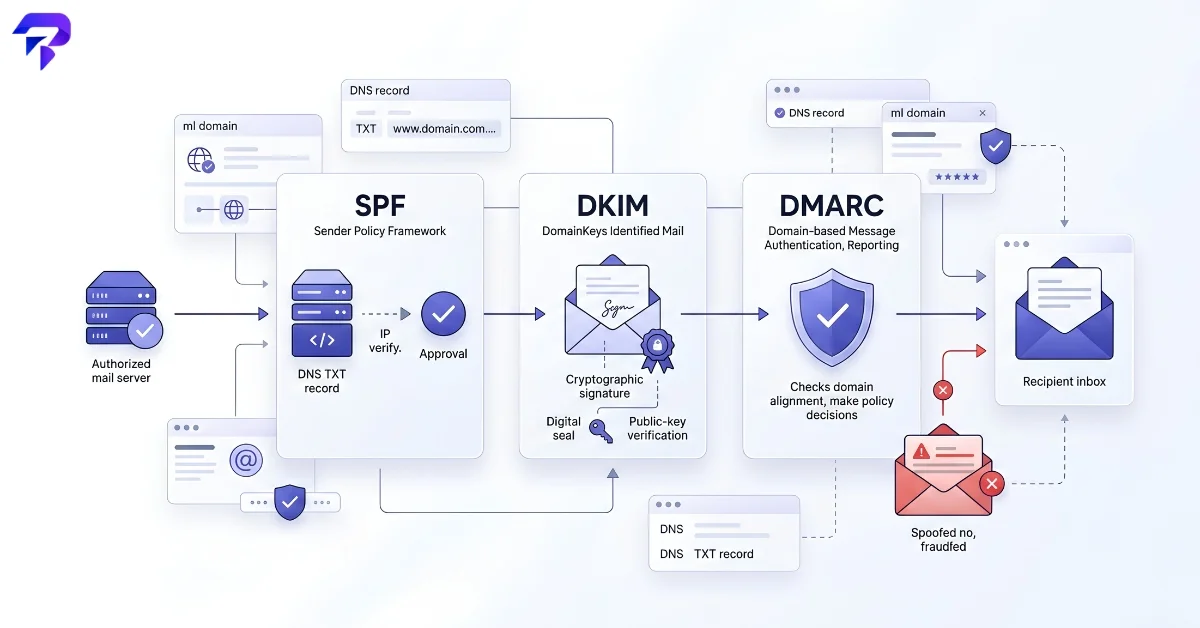
Quick answer: SPF lists which mail servers are allowed to send email for your domain. DKIM adds a cryptographic signature so receiving servers can verify a message wasn’t altered in transit. DMARC tells receiving servers what to do when SPF or DKIM checks fail, and reports back on the results. All three are DNS TXT records, and you generally want all three set up together — not just one — for real protection against spoofing.
The Problem These Records Solve
Email’s original design has no built-in way to verify that a message actually came from who it claims to be from. Anyone can set the “From” field to your domain and send an email that looks legitimate to both spam filters and human recipients — a technique called domain spoofing, and the basis for most phishing attacks that impersonate a real company. SPF, DKIM, and DMARC exist to close that gap, and they do it as three separate DNS records that work together rather than one setting you flip on.
SPF: Who’s Allowed to Send
Sender Policy Framework (SPF) is essentially an allowlist. It’s a DNS TXT record published on your domain that lists the specific mail servers and IP addresses authorized to send email on your behalf. When a receiving mail server gets a message claiming to be from your domain, it checks the sending server’s IP against your published SPF record. If the IP isn’t on the list, the message fails SPF — a strong signal (though not a guarantee, on its own) that something’s wrong.
The catch: SPF only checks the server that sent the message, not the “From” address a recipient actually sees. This is why SPF alone isn’t sufficient — it can pass on a technically-authorized server while still relaying spoofed mail if that server’s configuration is loose.
DKIM: Proving the Message Wasn’t Altered
DomainKeys Identified Mail (DKIM) works differently. Your outgoing mail server attaches a cryptographic signature to each message, generated using a private key. The corresponding public key is published in your DNS. When the message arrives, the receiving server retrieves that public key and verifies the signature — confirming both that the message really was signed by your domain’s mail system, and that its content (headers and body) wasn’t tampered with after it was sent.
DKIM answers a different question than SPF: not “was this sent from an authorized server,” but “was this message actually signed by the domain it claims to be from, and is it unmodified.” A message can pass one check and fail the other, which is exactly why both exist.
DMARC: The Policy Layer That Ties Them Together
Domain-based Message Authentication, Reporting, and Conformance (DMARC) sits on top of both. It’s a DNS record that does two things: it tells receiving mail servers what to do when a message fails SPF and/or DKIM alignment (that failing message’s “From” address doesn’t match what SPF or DKIM verified), and it asks those servers to send you reports on the results.
A DMARC record’s policy tag controls the enforcement level:
- p=none — take no action, just collect reports. This is the recommended starting point so you can see what’s failing before you start blocking mail.
- p=quarantine — send failing messages to spam/junk instead of the inbox.
- p=reject — block failing messages outright. This is the strongest setting, typically adopted only after you’ve confirmed via reporting that your legitimate mail isn’t getting caught in the process.
Without a DMARC record at all, there’s no consistent policy — different receiving servers make their own judgment calls about what to do with mail that fails SPF or DKIM, and you get no visibility into spoofing attempts happening against your domain.
Do You Need All Three?
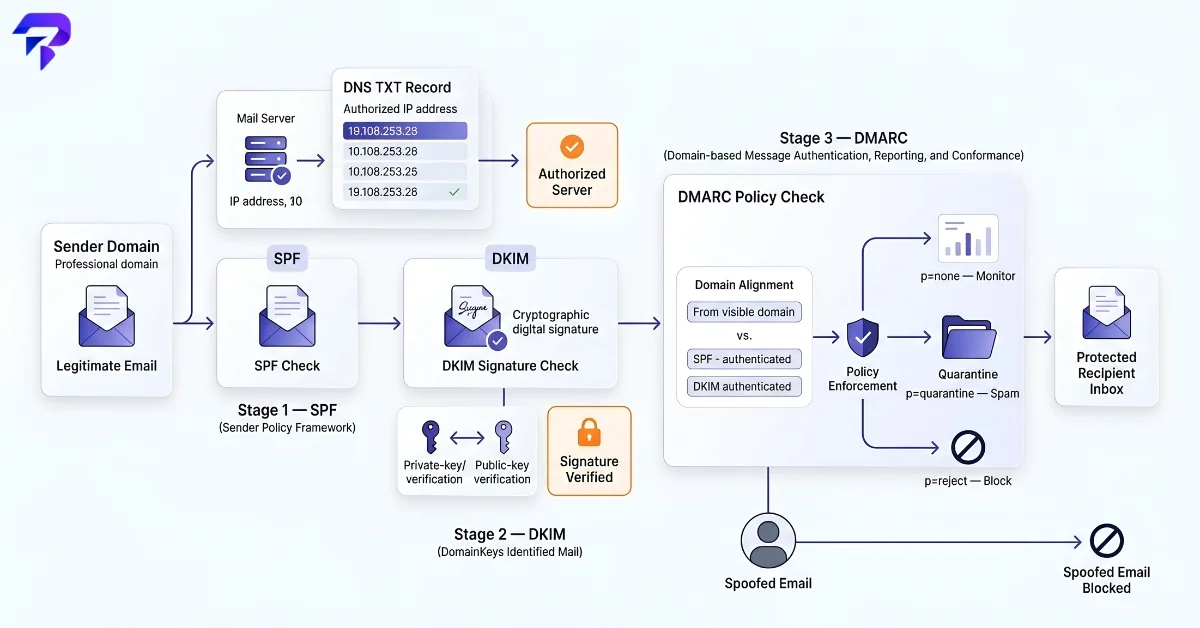
For real protection, yes. SPF alone stops some spoofing but has known bypass techniques. DKIM alone verifies integrity but doesn’t restrict who can send. DMARC alone has nothing to enforce without SPF or DKIM already in place beneath it — it’s the policy layer, not a replacement for the other two. The combination is what makes each one’s weakness covered by the others.
Checking Where You Currently Stand
Most domains that have never touched email security have none of these records set up, which is worth confirming rather than assuming. Run your domain through ToolPremier’s SPF/DKIM/DMARC Checker to see your current records (or confirm you don’t have any yet) before making changes. It’s also worth checking whether your domain has ended up on a spam blacklist — a common downstream effect of a domain with no authentication being used for spoofed mail — and separately confirming your SSL certificate is valid, since browsers and mail clients increasingly treat weak transport security as its own trust signal alongside email authentication.
If you’re troubleshooting mail deliverability more broadly and want to rule out basic connectivity issues first, confirming whether a related outage is on your end or theirs and knowing your own IP are useful first steps before diving into DNS record changes.
Frequently Asked Questions
Do I need SPF, DKIM, and DMARC, or just one of them?
All three, ideally. Each covers a gap the others leave open — SPF checks the sending server, DKIM verifies message integrity, and DMARC enforces a policy and gives you visibility when either check fails.
What happens if my domain has no DMARC record?
Receiving mail servers make their own inconsistent decisions about what to do with spoofed mail claiming to be from your domain, and you get no reports telling you it’s happening. It’s the most common reason a domain gets used in phishing attempts without the owner ever finding out.
What do p=none, p=quarantine, and p=reject actually mean?
They’re DMARC policy levels: none takes no action but collects reports, quarantine sends failing mail to spam, and reject blocks it outright. Most guidance recommends starting at none, reviewing reports, then moving to quarantine and eventually reject once you’re confident legitimate mail won’t get caught.
How do I know if my domain already has these records set up?
Check your domain’s DNS TXT records directly, or use a checker tool that looks them up for you and explains what’s present or missing.
Will setting these up stop my emails from going to spam?
It helps, but it’s not the only factor. Email authentication improves your domain’s trust signal to receiving servers, but sending reputation, content, and recipient engagement also affect spam placement.
The Bottom Line
SPF, DKIM, and DMARC each close a different gap in email authentication, and running all three — with DMARC actually set to enforce a policy, not just monitor — is what stops spoofed mail from reaching your recipients’ inboxes convincingly. Check your domain’s current records before assuming they’re already in place; a missing DMARC record is more common than most domain owners expect.


