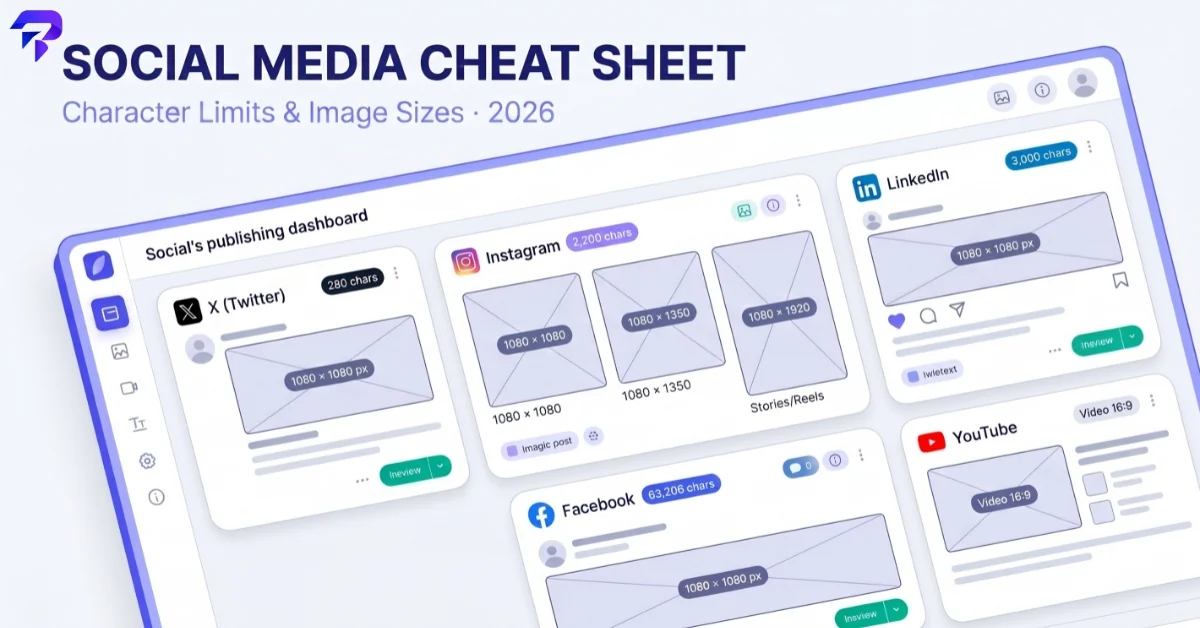
Quick answer: In 2026, X (Twitter) allows 280 characters on a free account and up to 25,000 with Premium; Instagram captions max out at 2,200 characters with a 30-hashtag cap; LinkedIn posts allow 3,000 characters; and Facebook technically allows 63,206 characters, though almost nobody should use that much. For images, the safe defaults that work almost everywhere are a 1080×1080px square or 1080×1350px portrait for feed posts, 1080×1920px for Stories and Reels, and platform-specific sizes for cover photos and profile pictures, which are listed platform by platform below. If you just want the numbers, the tables in each section have them. If you want to avoid re-checking this every few months, ToolPremier’s free counters and formatters do the checking for you before you hit publish.
These limits change more often than people expect — platforms quietly adjust visible-preview cutoffs, hashtag caps, and image compression behavior every year. Everything below was checked against current 2026 sources; anywhere a number is genuinely unsettled across sources, that’s called out explicitly instead of guessed at.
The short version: character limits at a glance
| Platform | Standard limit | Practical “don’t get cut off” limit | Notes |
|---|---|---|---|
| X (Twitter) | 280 characters (free) / 25,000 (Premium) | 280 for reach; write for the first ~1–2 lines | Premium/Premium+ subscribers get the higher limit |
| 2,200 characters (caption) | ~125 characters before “more” | Hashtag cap: 30 per post | |
| 3,000 characters (post) | ~140–210 characters before “see more” | Headline: 220 chars; About: 2,600 chars | |
| 63,206 characters | First couple of lines before “See more” | Practically limited by readability, not the cap |
Now the detail, platform by platform, plus the image dimensions each one actually wants.
X (Twitter): character limits and image sizes in 2026
X’s character limit still depends entirely on whether you’re paying. A free account gets 280 characters per post — the same limit X (then Twitter) has used for years. X Premium and Premium+ subscribers can post up to 25,000 characters, which effectively turns a single post into a short article.
Bio length is capped at 160 characters, which hasn’t changed.
Even with a 25,000-character ceiling available, most high-performing posts on X are still short. The feed rewards posts that make their point in the first line, so treat the higher limit as headroom for threads and longer takes, not a default. Run your draft through the X Character Counter before posting if you’re anywhere near either limit — it’s easy to misjudge, especially with links and emoji, which X counts differently than plain text.
If you don’t have Premium, the classic workaround is still a thread: split a longer idea across multiple 280-character posts rather than trying to cram everything into one. It also tends to perform better than a single long post would, since each reply is a fresh chance for someone to engage.
X image sizes (2026):
| Asset | Recommended size | Aspect ratio |
|---|---|---|
| Profile picture | 400×400px | 1:1 |
| Header/banner photo | 1500×500px | 3:1 |
| In-post image (landscape) | 1600×900px (or 1280×720px) | 16:9 |
| In-post image (square) | 1080×1080px | 1:1 |
X compresses images fairly aggressively, so starting from a properly sized file rather than an oversized one gives you more control over how it looks after upload.
Instagram: character limits and image sizes in 2026
Instagram’s caption limit is 2,200 characters — long enough for genuine storytelling, but only the first roughly 125 characters show in the feed before Instagram truncates to “… more.” Anything important — your hook, your call to action — needs to land in that first line and a half.
Bio length is capped at 150 characters, and Instagram enforces a hard cap of 30 hashtags per post (comments included, if you use that placement instead). Posts using more than 30 simply won’t publish with the excess included.
Because Instagram only allows one clickable link in a bio, most creators end up needing a single landing page that fans out to everything else — new posts, a shop, other platforms. That’s exactly what a bio link page generator is for, and it’s worth setting up once rather than swapping your bio link every time you post something new.
For the caption itself — line breaks, spacing, emoji placement — Instagram’s own text box doesn’t make formatting easy. The Instagram Caption Formatter handles spacing and structure so your caption doesn’t collapse into a wall of text. And since hashtags are still doing real discovery work on Instagram in 2026, the hashtag generator is a fast way to build a relevant set without guessing.
Instagram image sizes (2026):
| Asset | Recommended size | Aspect ratio |
|---|---|---|
| Profile picture | 320×320px | 1:1 |
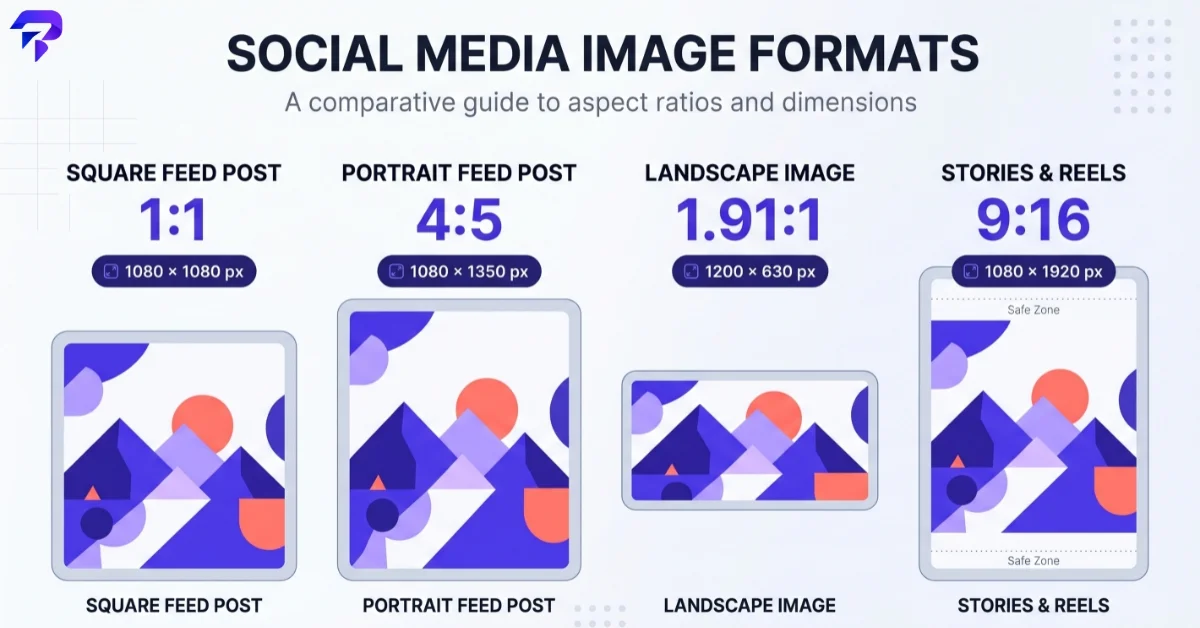
| Feed post (square) | 1080×1080px | 1:1 |
| Feed post (portrait) | 1080×1350px | 4:5 |
| Feed post (landscape) | 1080×566px | 1.91:1 |
| Story / Reel | 1080×1920px | 9:16 |
Portrait (4:5) posts take up more vertical space in the feed than square ones, which is a meaningful visibility advantage — it’s one reason 4:5 has become the default choice for a lot of accounts rather than the classic square.
One thing that trips people up: carousels don’t get their own separate spec. Every image in a carousel gets cropped to match the aspect ratio of the first slide, so if slide one is square and slide four is portrait, slide four gets cropped down to square without asking. Pick one ratio before you build the set, not after.
LinkedIn: character limits and image sizes in 2026
LinkedIn posts allow up to 3,000 characters. The bigger factor for engagement is the truncation point: LinkedIn cuts posts off after roughly 140 characters on mobile and around 210 on desktop, showing “…see more” beyond that. That first couple of lines is effectively your headline — write it like one.
A few related LinkedIn limits worth knowing: the headline field allows 220 characters (though only 60–70 typically show in search results), the About section allows 2,600 characters (with only around 300 visible before its own “see more”), and comments are capped at 1,250 characters and display in full without truncation.
Worth knowing for anything genuinely long-form: LinkedIn’s native “article” format has a much larger ceiling — reported at somewhere around 110,000 characters — which exists specifically for cases where a post’s 3,000-character limit is too tight. If you’re publishing something closer to a blog post than an update, the article format is the better fit rather than fighting the post limit.
LinkedIn is also less forgiving of formatting than it looks — paste in bullet points or spacing from a document and it often collapses on publish. The LinkedIn Post Formatter keeps line breaks and structure intact so your post reads the way you wrote it, not as one dense paragraph.
LinkedIn image sizes (2026):
| Asset | Recommended size | Aspect ratio |
|---|---|---|
| Profile picture | 400×400px | 1:1 |
| Cover/banner photo (personal profile) | 1584×396px | 4:1 |
| Post image (square) | 1080×1080px | 1:1 |
| Post image (link preview) | 1200×627px | ~1.91:1 |
If you’re sharing a link rather than a native image, LinkedIn generates its own preview thumbnail from the page’s Open Graph image — sizing that image correctly on your own site matters more than anything you upload directly to the post.
Facebook: character limits and image sizes in 2026
Facebook’s technical post limit is 63,206 characters — it has stayed at that oddly specific number for years and hasn’t changed. In practice this is close to meaningless as a constraint: readers won’t scroll through anything close to that length in a feed. Facebook truncates long posts after just the first couple of lines with a “See more” prompt, so the real limit that matters is whatever gets your point across before that cutoff.
Because so few posts approach the true cap, it’s more useful to think about Facebook’s limit as “effectively unlimited, but write short anyway” than to aim for a specific truncation number. Different post types (page posts, groups, personal profiles) can also render slightly differently, so if a specific post’s preview matters — a launch announcement, a link share with custom text — check it before it goes live with the Facebook Post Previewer rather than guessing how it’ll wrap and truncate.
Facebook image sizes (2026):
| Asset | Recommended size | Aspect ratio |
|---|---|---|
| Profile picture | 320×320px | 1:1 |
| Cover photo | 851×315px | ~2.7:1 |
| Post/shared image (square) | 1080×1080px | 1:1 |
| Post/shared image (link preview) | 1200×630px | ~1.91:1 |
Facebook’s cover photo crops differently on mobile versus desktop, so keep the important part of any cover image centered rather than pushed to the edges — text or faces near the corners are the most common casualty of the crop.
Pages, groups, and personal profiles all share the same underlying character limit, but they don’t behave identically in the feed — a group post and a page post with identical text can wrap and truncate at slightly different points depending on where they’re viewed. If a post is going out to more than one of these surfaces, it’s worth previewing each version rather than assuming they’ll match.
A quick note on YouTube
YouTube isn’t a caption-driven platform the way the others are, so it doesn’t fit neatly into a character-limit table — but thumbnail sizing is worth including because getting it wrong is a common, avoidable mistake. The standard recommended thumbnail size is 1280×720px at a 16:9 aspect ratio, and channel banners are sized at 2560×1440px, also 16:9.
If you’re studying what’s working in your niche, the YouTube Thumbnail Downloader pulls the full-resolution thumbnail from any video, which is a quick way to see exactly what a high-performing thumbnail looks like at full size rather than the compressed version YouTube shows in search results.
How to check before you post
Specs like these are easy to get approximately right and just as easy to get subtly wrong — a caption that’s fine at 2,100 characters but truncates a call-to-action, an image that’s technically within the size limit but crops out the one thing that mattered. A few habits fix most of it:
- Count before you paste. Character counts get thrown off by emoji, links, and line breaks more than people expect — tools like the X Character Counter count the way the platform actually counts, not the way a word processor does.
- Check the visible cutoff, not just the max. On Instagram, LinkedIn, and Facebook, the character you should actually care about is where “see more” kicks in — write your hook to survive that cut.
- Size images for the platform, not for “social media” in general. A 1080×1080 square works almost everywhere, but cover photos, headers, and banners each have their own crop zone. ToolPremier’s social media image size guide covers the full set in one place if you’re prepping assets for more than one platform at once.
- Preview before you publish, especially on platforms like Facebook and LinkedIn where formatting can silently break on paste.
None of these specs are fixed forever — expect at least one platform to quietly adjust a limit again before the year is out. The safest habit isn’t memorizing every number above; it’s checking your actual post against the current limit right before you hit publish.
FAQs
Do X’s shortened links (t.co) count against the character limit?
Yes, but not for their real length. X automatically shortens every link posted to a t.co wrapper exactly 23 characters long, regardless of how long the original URL is — so a link never costs you more than that fixed amount, whether the real URL is 20 characters or 200. Other platforms (Instagram, LinkedIn, Facebook) count links as their literal typed length, so a long URL there does eat into your budget the normal way.
Do emoji count as one character toward these limits?
Often more than one. Character limits are typically counted in UTF-16 code units, not visual glyphs. A simple emoji like a smiley can count as 2, and a compound emoji built from multiple code points joined with a zero-width joiner — a family emoji, or a skin-tone-modified emoji — can count as 4 or more, even though it displays as a single image. If you’re right up against a limit, count with the platform’s own composer rather than a plain text editor, since the two won’t always agree.
Do Reels and Stories captions follow the same limits as regular feed captions?
Mostly yes, with one exception. Instagram Reels captions follow the same 2,200-character cap and truncation behavior as regular feed captions. Stories are different — text you overlay on a Story image isn’t governed by a caption character limit at all, since it’s rendered as part of the image rather than as searchable text; the practical limit there is legibility on a small screen, not a character count.
Is matching the aspect ratio enough, or does image resolution matter too?
A note on accuracy: the numbers above reflect current 2026 platform documentation and cross-checked reference sources at the time of writing. Where a specific figure (like Facebook’s visible-truncation point, which varies by post type and surface) isn’t consistently reported across sources, it’s described in general terms above rather than stated as an exact number. Platforms change these specs without much notice, so if you’re working on something high-stakes — a launch, a paid campaign — verify the current number directly on the platform before finalizing.
The Bottom Line
Character limits and image specs change platform by platform and shift over time, so treat the numbers above as a reliable starting point rather than a permanent reference. For anything high-stakes — a paid campaign, a major launch — verify the current limit directly on the platform before you publish.