
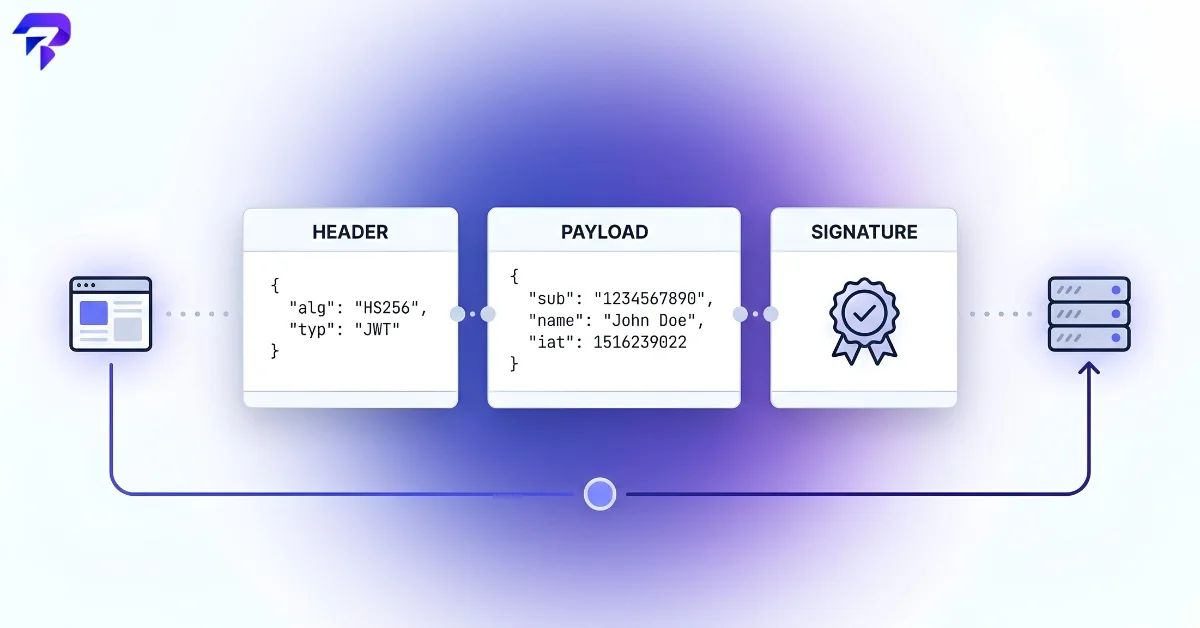
The three parts of a JWT
Every JWT is three Base64URL-encoded strings joined by dots: header.payload.signature. Paste one into ToolPremier’s JWT Decoder and you’ll see it split back into its pieces in plain JSON.
The header is a small JSON object naming the token type and signing algorithm, typically something like {"alg":"HS256","typ":"JWT"}. The payload holds the actual claims — statements about the user or the token itself, such as who issued it and when it expires. The signature is a cryptographic value computed over the header and payload using the algorithm named in the header,
A worked example: decoding a JWT by hand
Here’s a complete, illustrative JWT built from a header and payload, so the pieces above aren’t just abstract (per RFC 7519, the IETF standard that defines the JWT format):
eyJhbGciOiJIUzI1NiIsInR5cCI6IkpXVCJ9.eyJzdWIiOiIxMjM0NTY3ODkwIiwibmFtZSI6IkphbmUgRG9lIiwiaWF0IjoxNzAwMDAwMDAwLCJleHAiOjE3MDAwMDM2MDB9.HpfPaYxiGfhEyuXx48gaWEjKBeeaoRVMRxeQJtF9e6c
Split on the dots and decode the first two parts, and this is what’s inside:
| Part | Decoded JSON |
|---|---|
| Header | {"alg":"HS256","typ":"JWT"} |
| Payload | {"sub":"1234567890","name":"Jane Doe","iat":1700000000,"exp":1700003600} |
The payload’s iat (1700000000) and exp (1700003600) are Unix timestamps — 2023-11-14 22:13:20 UTC to 2023-11-14 23:13:20 UTC, a one-hour validity window. The signature here was computed with HMAC-SHA256 over the header and payload using a demo secret; change one character in the payload and re-sign it, and the signature no longer matches — which is exactly the tamper-check the next section explains.
Why a JWT looks unreadable — and why that’s misleading
A JWT’s header and payload are encoded with Base64URL, the URL-safe variant of Base64 (see our explainer on how Base64 encoding actually works). Encoding is not encryption: it’s a reversible, public transformation with no secret involved, so decoding a JWT’s header and payload takes nothing more than running the string through the standard Base64URL alphabet. Anyone who intercepts a JWT — a browser extension, a proxy, a coworker glancing at dev tools — can read every claim inside it in seconds. That’s exactly why sensitive data (passwords, full card numbers, anything you wouldn’t put in a URL) has no business sitting in a JWT payload, signed or not.
What the signature actually does
If the payload is fully readable anyway, the signature is what makes a JWT trustworthy rather than just structured. Signing algorithms fall into two families. HS256 (HMAC-SHA256) uses one shared secret key — the same key both signs and verifies the token, so it only works when a single party (like your own backend) issues and checks every token. RS256 (RSA) uses a private/public key pair instead: the issuing server signs with a private key it never shares, and anyone holding the corresponding public key can verify the signature without ever being able to forge one. That distinction is exactly why SHA-256 rather than an older, broken hash underpins the HMAC in HS256 — a signature is only as trustworthy as the hash function it’s built on.
Verifying the signature is what actually confirms a JWT hasn’t been tampered with. Change a single character in the payload — bump a user ID, extend an expiry date — and the signature no longer matches, because it was computed over the original, unmodified string. A server that skips signature verification and just trusts whatever claims it finds in the payload has no real security at all, regardless of how official the token looks.
The claims you’ll actually see in the payload
JWT payloads commonly include a handful of standardized (but optional) fields known as registered claims: iss (issuer — who created the token), sub (subject — usually the user ID this token represents), aud (audience — who the token is intended for), exp (expiration time, as a Unix timestamp), and iat (issued-at time). None of these are required by the JWT spec, but exp in particular is worth checking for by habit: a JWT with no expiration claim is a token that, once issued, never stops being valid on its own.
What JWTs are actually for
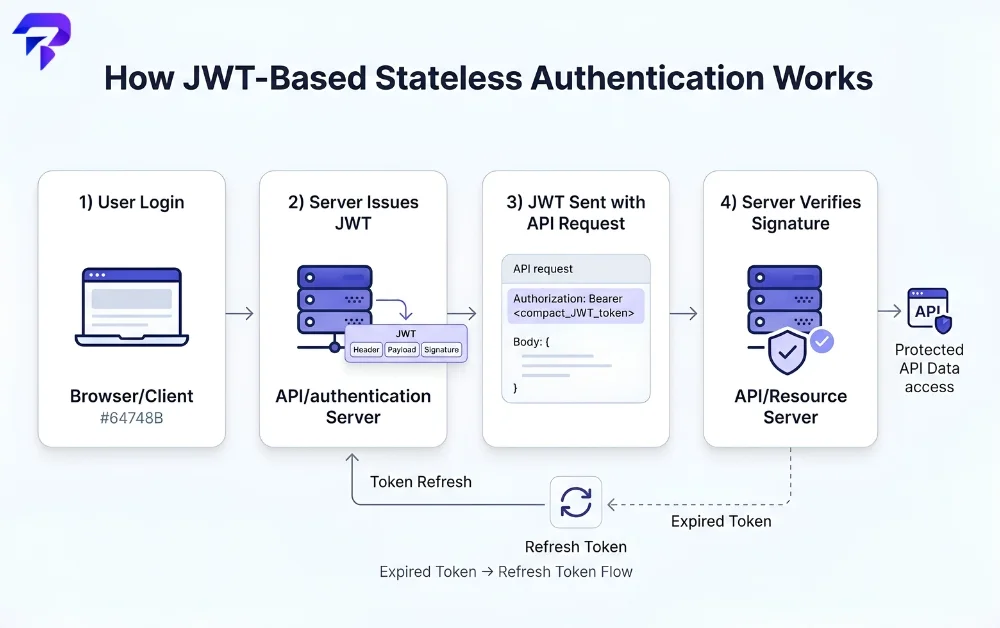
The typical use case is stateless authentication: a server issues a signed JWT after login, the client sends it back with every request (usually in an Authorization header), and the server verifies the signature instead of looking the session up in a database each time. That’s faster and simpler to scale than server-side session storage, which is why JWTs are common in single-page apps and APIs. The tradeoff is that a JWT can’t easily be revoked before it expires — since there’s no central session store to delete an entry from — so short expiration times, paired with a separate refresh-token flow, matter more here than they would with traditional sessions.
Decoding a JWT to check what’s actually inside it
If you’ve ever wanted to see exactly what claims an API or a login flow is actually sending — without writing code to do it — pasting the token into ToolPremier’s JWT Decoder splits it into readable header and payload JSON instantly, entirely in your browser. It won’t tell you whether the signature is valid (that requires the secret or public key, which a client-side tool has no business asking for), but it will show you exactly what’s in a token — which is often enough to debug why an API call is being rejected or an expiry date isn’t what you expected.
FAQs
Can I edit a JWT’s payload myself and have the server still accept it?
You can edit the decoded text, but re-encoding it won’t produce a token the server accepts. Changing anything in the payload changes the string the signature was computed over, so the signature no longer matches once you re-encode it — a server doing proper verification rejects it immediately. The only way to produce a valid signature for edited claims is to hold the secret or private key used to sign it, which is exactly the thing a legitimate token holder never has access to.
Is it safe to store a JWT in localStorage, or should it go in a cookie?
Both are used in practice, and both carry a different risk. A JWT in localStorage is readable by any JavaScript running on the page, which makes it vulnerable if the site has a cross-site scripting (XSS) flaw anywhere. A JWT in an httpOnly cookie can’t be read by JavaScript at all, closing that specific hole, but cookies bring their own need for CSRF protection since browsers attach them to requests automatically. Neither option is a complete fix on its own — the choice usually comes down to which risk your specific application is better equipped to defend against.
Is a JWT the same thing as an API key?
No, though both get sent as credentials with a request. An API key is typically a long-lived, static secret string that identifies an application or account and usually doesn’t expire on its own. A JWT is short-lived by design, signed, and carries structured claims about a specific authenticated session or user — it’s meant to be issued, used briefly, and replaced, not treated as a permanent static credential the way an API key often is.
Are there known attacks that exploit how JWTs handle their signing algorithm?
Yes — this is a well-documented class of vulnerability, not a new or obscure one. Some early JWT libraries would trust the algorithm named in a token’s own header, which meant an attacker could submit a token claiming "alg":"none" and have it accepted with no signature check at all, or trick a server expecting RS256 into treating a public key as an HMAC secret. Modern libraries and correctly configured servers close this by explicitly specifying and enforcing the expected algorithm server-side rather than trusting whatever the token claims about itself — which is a server-implementation detail, not something the JWT format itself can be blamed for.
The Bottom Line
A JWT’s payload is readable by anyone who has the token — it’s signed, not encrypted — so the signature verifies the data wasn’t tampered with, but it does nothing to hide it. Never put sensitive information directly in a JWT payload, and always let the server enforce the signing algorithm rather than trusting whatever the token claims about itself.


