
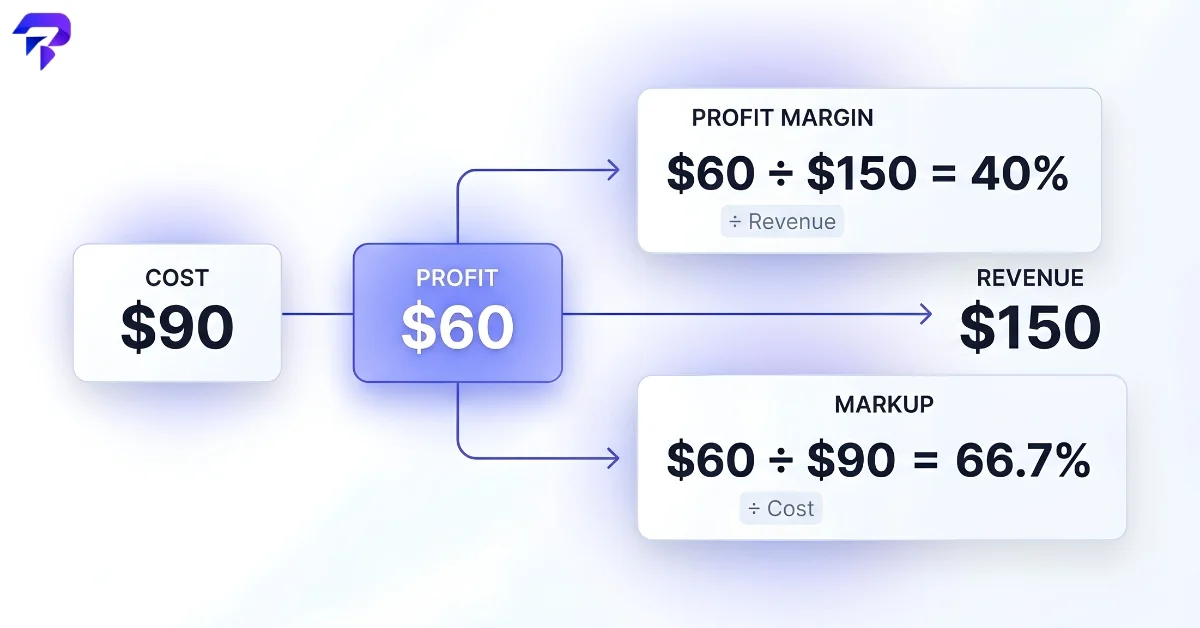
Quick answer: Profit margin divides your profit by revenue; markup divides the same profit by cost. Same numbers, different denominator, very different percentage — a $60 profit on a $90 cost is a 40% margin but a 66.7% markup. Mixing the two up is one of the most common pricing mistakes small businesses make, and it usually means underpricing.
The two formulas
Profit margin tells you what share of your revenue is actual profit:
Profit Margin = (Revenue − Cost) ÷ Revenue × 100
Markup tells you how much you added on top of what something cost you:
Markup = (Revenue − Cost) ÷ Cost × 100
The numerator is identical in both — it’s your profit either way. The only difference is what you’re dividing it by: revenue (the price you actually charge) for margin, or cost (what you paid or spent to produce it) for markup. That single difference is why the two numbers are never equal except at 0%.
Worked example: the same $60 profit, two different percentages
Say a product costs you $90 to make or acquire, and you sell it for $150. Your profit is $60 either way you slice it.
| Metric | Calculation | Result |
|---|---|---|
| Profit margin | $60 ÷ $150 | 40% |
| Markup | $60 ÷ $90 | 66.7% |
Markup is always the larger number when there’s a profit at all, because it’s dividing by the smaller figure (cost is always less than revenue when you’re profitable). This is exactly the gap that causes pricing mistakes: someone aiming for a “40% margin” who instead applies a 40% markup to their cost ends up pricing lower than they intended — a 40% markup on a $90 cost only reaches a $126 price ($36 profit), which works out to a 28.6% margin, not 40%.
Converting between margin and markup
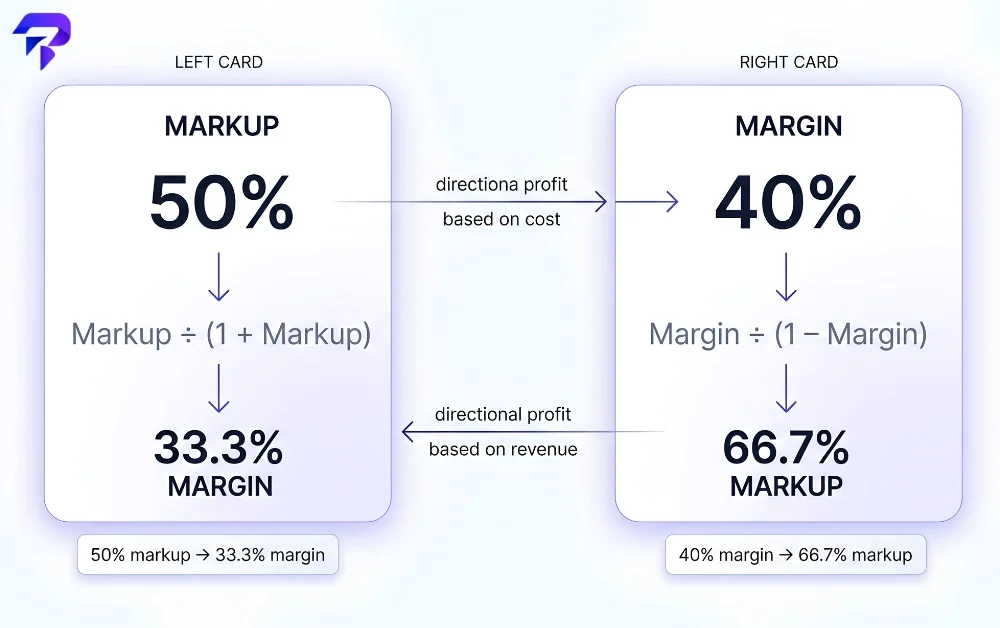
Because both numbers describe the same underlying profit, you can convert one to the other without knowing the original dollar figures:
- Markup to margin: Margin = Markup ÷ (1 + Markup)
- Margin to markup: Markup = Margin ÷ (1 − Margin)
Using the example above: a 66.7% markup converts to 66.7% ÷ 1.667 = 40% margin, which checks out. And a 50% markup — a common round-number pricing target — actually converts to only a 33.3% margin, not 50%. That gap gets bigger, not smaller, as the percentages climb, which is exactly why confusing the two matters more at higher target profit levels, not less.
Why this distinction actually matters for pricing
Margin and markup answer two different business questions. Margin tells you what percentage of every sales dollar you keep — useful for comparing profitability across products, setting overall business targets, and understanding how much room you have to discount before profit disappears. Markup tells you how much to add to a known cost to reach a price — useful at the point of actually setting that price, especially in retail, wholesale, and contracting, where “cost-plus” pricing is standard practice.
The mistake happens when someone uses the wrong one for the task: applying a margin percentage as if it were a markup percentage (or the reverse) systematically misprices the product, and the size of the error grows with the percentage involved. A business that thinks it’s running a comfortable 50% margin but is actually applying a 50% markup is really operating at a 33.3% margin — a gap that can be the difference between a profitable line and a break-even one once other costs are accounted for.
Calculate either one instantly
ToolPremier’s Profit Margin Calculator takes your revenue and cost and returns the margin directly, while the Margin Calculator works from either direction — enter a cost and target margin to solve for the price you need to charge, or enter cost and price to check the resulting margin. If you’re deciding on a broader return-on-investment question rather than a single product’s pricing, the ROI Calculator handles that separate calculation.
Getting pricing right matters just as much once you’re actually invoicing for it — our comparison of using a free invoice generator versus a Word template covers the practical side of turning a correctly-priced product or service into a professional invoice.
Margin is one of several numbers worth checking before you set a price. Our roundup of free small business calculators covers break-even, tax and marketing maths too, and if you’re financing stock or equipment, how to calculate loan EMI shows what the monthly repayments will cost.
FAQs
Can markup ever be higher than 100%, and can margin?
Markup can go well above 100% — that just means your profit is larger than your cost, which is common for low-cost, high-value items (a $5 item sold for $15 is a 200% markup). Margin can never reach or exceed 100%, since that would require cost to be zero or negative; a margin gets closer to 100% only as cost shrinks toward nothing relative to revenue, but a real margin percentage always stays below it.
Is “gross margin” the same thing as the “margin” in this article?
Close, but the terminology gets more specific in accounting. “Gross margin” specifically means revenue minus the direct cost of producing or acquiring what you sold (cost of goods sold), expressed as a percentage of revenue — which is exactly the margin formula used above. “Net margin” is a stricter, smaller number: it subtracts all business expenses, not just direct product cost — rent, salaries, marketing, everything. When comparing your numbers to a competitor’s or an industry benchmark, confirm which margin they mean, since gross and net margin for the same business can look very different.
Does “cost” in these formulas mean just the product cost, or everything it took to sell it?
It depends on which cost figure you plug in, and that choice changes what the resulting margin or markup actually tells you. Using only the direct cost (materials, wholesale price) gives you gross margin/markup — useful for pricing decisions at the product level. Using a fully-loaded cost that includes shipping, packaging, payment processing fees, and a share of overhead gives a more realistic picture of what you actually keep, but it’s a different, smaller number than a simple cost-of-goods-based calculation. Be consistent about which one you’re using before comparing numbers across products or time periods.
My point-of-sale system only lets me set prices by markup percentage — how do I hit a specific margin target?
Use the margin-to-markup conversion: Markup = Margin ÷ (1 − Margin). If your target is a 40% margin, that converts to a 66.7% markup — enter 66.7% into the POS system’s markup field, and the resulting price will land at your intended 40% margin. Skipping this conversion and entering your margin target directly as a markup percentage is exactly the mistake that quietly underprices products, as shown in the worked example above.
The bottom line
Profit margin and markup describe the exact same profit from two different angles — margin as a percentage of revenue, markup as a percentage of cost — and they’re only equal when there’s no profit at all. Know which one you’re actually targeting before you set a price, because using the wrong formula quietly underprices whatever you’re selling.


