
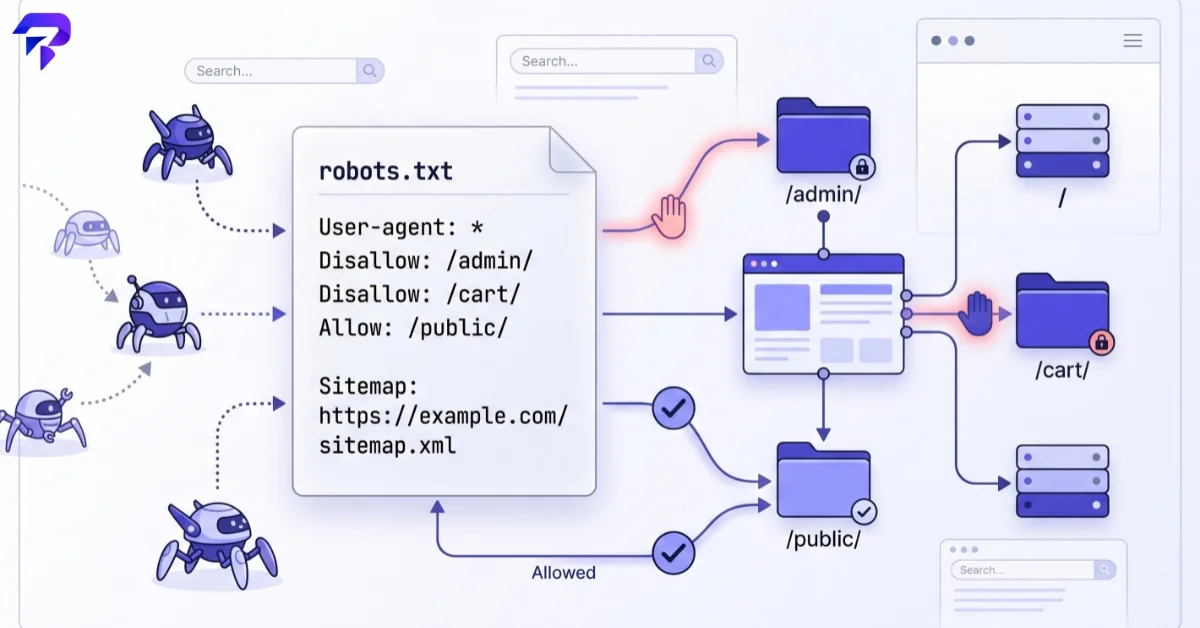
What robots.txt actually controls
Robots.txt governs crawling — whether a bot is permitted to request a given URL. It does not directly control indexing — whether a page shows up in search results. That distinction causes more confusion than almost anything else in technical SEO.
Here’s the common mistake: a page is blocked in robots.txt so the crawler never visits it, but the page is still linked from somewhere else on the web. Search engines can index a URL based on those external signals alone — title and all — without ever reading the page’s content, because robots.txt told them not to fetch it. The result is a bare, unhelpful search listing for a page you thought you’d hidden.
If the actual goal is keeping a page out of search results, the correct tool is a noindex meta tag or an X-Robots-Tag HTTP header on that page — and critically, the page has to be crawlable for the crawler to ever see that instruction. Blocking a page in robots.txt while also trying to noindex it is a contradiction that usually backfires.
Basic syntax
A robots.txt file is made of simple directives grouped by user-agent:
User-agent: *
Disallow: /admin/
Disallow: /cart/
Allow: /admin/public-notice/

Sitemap: https://example.com/sitemap.xml
User-agent specifies which crawler the rule applies to (* means all of them). Disallow blocks a path. Allow carves out an exception within a blocked path. Sitemap points crawlers to your XML sitemap so they can discover URLs efficiently — it’s optional but genuinely useful, and can be listed even if you also submit the sitemap directly through Search Console.
Common mistakes
A few patterns show up repeatedly:
Blocking CSS or JavaScript folders. Search engines render pages the way a browser does to judge quality and mobile-friendliness. Blocking the assets a page needs to render correctly can hurt how it’s evaluated, even though the page’s HTML is technically crawlable.
Assuming Disallow means “remove from search.” As covered above, it doesn’t — it just stops the crawl. Existing indexed pages can also linger in results for a while after being disallowed, since the crawler can no longer revisit them to confirm removal.
Treating it as an access control. Robots.txt is publicly readable and voluntary — it relies on crawlers choosing to respect it. It’s not a way to keep sensitive content private; that requires actual authentication or server-level restrictions.
A missing or misconfigured file blocking everything by accident. A stray Disallow: / left over from a staging environment is one of the most common ways an entire production site accidentally drops out of search.
robots.txt vs. meta robots vs. structured data
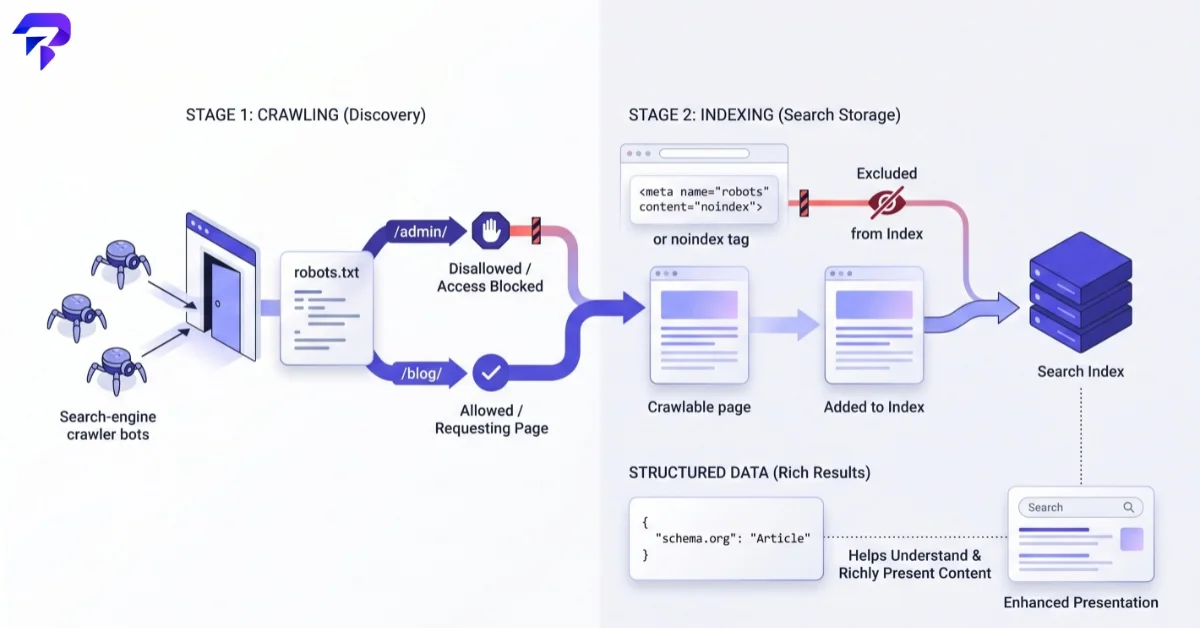
These three technical SEO elements often get lumped together but each does something distinct: robots.txt controls crawling at the file/path level, the meta robots tag controls indexing and link-following on an individual page, and structured data — covered in our guide to schema markup — controls how a page is understood and displayed, not whether it’s crawled at all. They work together rather than substituting for each other.
Building and testing yours
ToolPremier’s robots.txt generator puts together a correctly formatted file from your rules without hand-writing the syntax, and pairs naturally with the XML sitemap generator for the Sitemap directive. Once your technical SEO basics are in place, round it out with accurate meta titles and descriptions and a clean URL structure — robots.txt controls what gets crawled, but these determine what happens once it does.
FAQ
Does robots.txt guarantee a page stays out of Google?
No. It stops crawling, not indexing. A blocked page can still appear in results (usually without a real snippet) if it’s linked elsewhere. Use a noindex directive on a crawlable page for guaranteed removal.
Do I need a robots.txt file if my site is small?
It’s not strictly required, but it’s good practice — at minimum to point crawlers to your sitemap and to keep low-value paths (like internal search results or admin areas) out of the crawl budget.
Can robots.txt stop scrapers or malicious bots?
No. It’s an honor-system instruction that only well-behaved crawlers follow. Bots built to ignore it simply do, so it isn’t a security or anti-scraping measure.
The bottom line
Robots.txt is a crawling instruction, not a privacy or indexing switch — get that distinction right and most of the common mistakes disappear on their own. Keep it simple, point it at your sitemap, and use the right tool (noindex, not Disallow) when the actual goal is staying out of search results entirely.


