
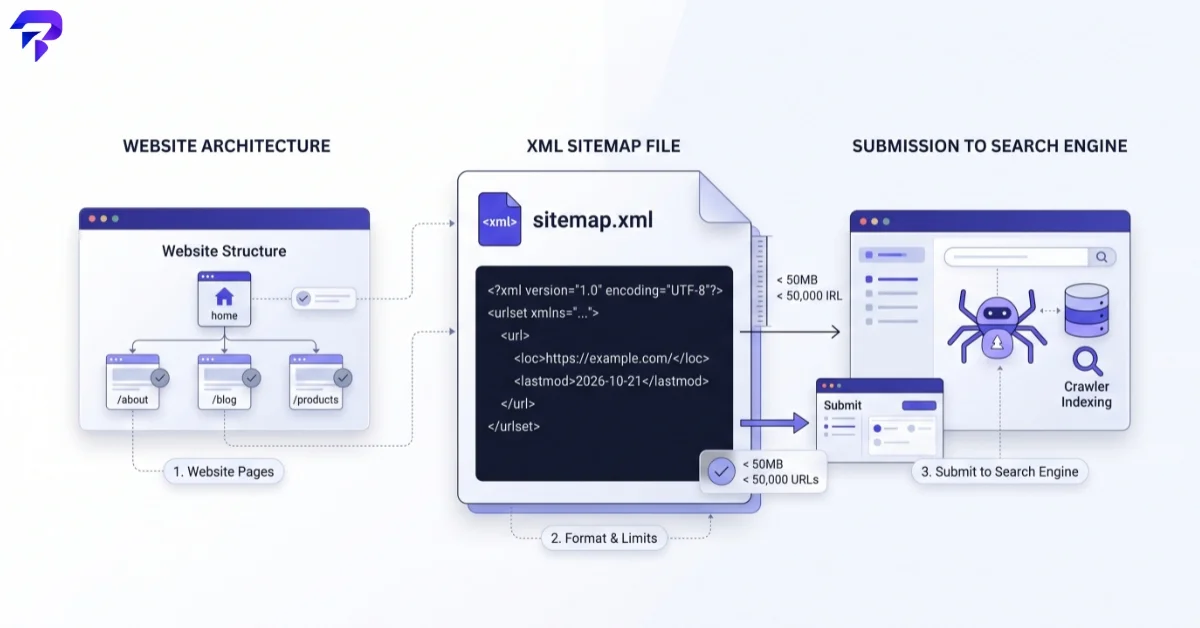
<url><loc> tags under a <urlset> root — one file can hold up to 50,000 URLs or 50MB uncompressed — then submit the sitemap’s address through Google Search Console’s Sitemaps report or list it in your robots.txt file.If you just want the finished file, ToolPremier’s XML Sitemap Generator builds a valid XML sitemap from a list of URLs you enter — no coding required. The rest of this guide covers the format behind it, the limits that apply, and how to get the file in front of search engines once it’s built.
What an XML sitemap is actually for
An XML sitemap doesn’t make a page rank better. It’s a discovery aid: a plain list of the URLs you want search engines to know about, handed to them directly instead of relying on crawlers to find every page by following links. That matters most for large sites, sites with pages that have few internal links pointing to them, and sites that publish new pages faster than crawlers would otherwise find them.
A sitemap can also carry a <lastmod> date per URL, which gives crawlers a hint about what has changed recently — useful on a site that updates often.
What the sitemap protocol actually requires
The format comes from the sitemaps.org protocol, the same spec Google, Bing, and other engines read. A handful of hard limits apply:
| Rule | Limit |
|---|---|
| URLs per sitemap file | 50,000 maximum |
| File size | 50MB (52,428,800 bytes) uncompressed — gzip is allowed, but the limit applies after decompression |
| Each URL inside <loc> | Must be under 2,048 characters and begin with the protocol (http/https) |
| Encoding | UTF-8 |
| More URLs than one file allows | Split them across multiple sitemaps and list those in a sitemap index file (<sitemapindex>), itself capped at 50,000 sitemaps and the same 50MB |
Go over the URL or size limit without splitting the file and some crawlers will simply stop reading partway through, so large sites should plan for an index file from the start rather than patch it in later.
Three ways to build one
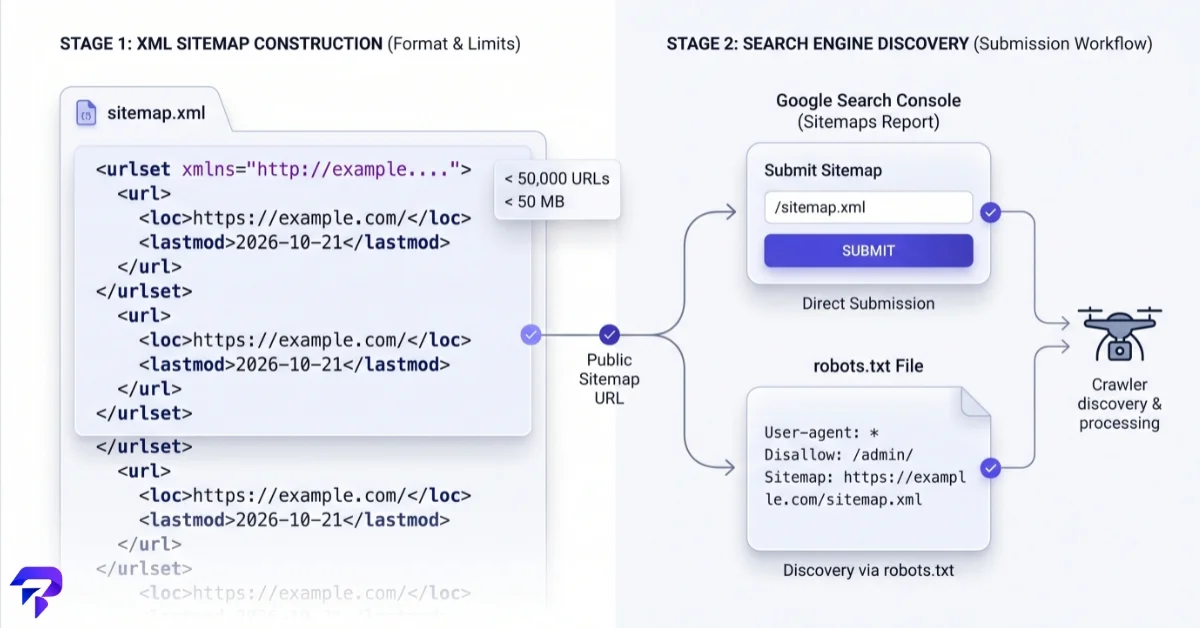
1. Let your CMS or SEO plugin generate it
Most CMS platforms and SEO plugins generate and auto-update an XML sitemap for you, usually at a predictable path like /sitemap.xml or /sitemap_index.xml. If your site already has one of these, building a new one by hand is unnecessary — check that path before doing anything else.
2. Hand-code a minimal sitemap
For a small, mostly static site, a sitemap is just a text file. The minimum valid structure looks like this:
<?xml version="1.0" encoding="UTF-8"?>
<urlset xmlns="http://www.sitemaps.org/schemas/sitemap/0.9">
  <url>
    <loc>https://example.com/</loc>
  </url>
  <url>
    <loc>https://example.com/about/</loc>
  </url>
  <url>
    <loc>https://example.com/contact/</loc>
  </url>
</urlset>
Only <loc> is required inside each <url> entry; <lastmod>, <changefreq>, and <priority> are optional, and search engines treat the last two as hints at best.
If typing out XML tags for every page isn’t practical, the sitemap generator linked above does the same job in your browser: add each URL (and an optional priority) to a list, and it assembles a downloadable XML file from exactly those entries. Nothing is uploaded or sent to a server to build it — the file is generated client-side from the URLs you type in, then handed to you as a download.
3. Generate it at the server or build level
Larger or frequently-changing sites (e-commerce catalogs, sites with user-generated pages) usually generate the sitemap programmatically on a schedule, pulling the URL list straight from the database or build pipeline so it never drifts out of sync with what’s actually published.
Getting your sitemap in front of Google
Once the file exists and is reachable at a public URL, there are two common ways to point search engines at it:
- Search Console: submit the sitemap’s URL through the Sitemaps report in Google Search Console, which also shows when Google last read it and flags any processing errors.
- robots.txt: add a line such as
Sitemap: https://example.com/sitemap.xmlto your robots.txt file. There’s no limit on how many sitemap lines a robots.txt file can list this way.
Worth knowing: Google’s own documentation describes submitting a sitemap as a hint, not a requirement — it doesn’t guarantee a page gets crawled, indexed, or ranked, and Google may not use the sitemap at all for a given crawl. A sitemap makes pages easier to find; it doesn’t force anything to happen after that. If you’re setting up robots.txt itself for the first time, ToolPremier’s Robots.txt Generator builds the file’s crawl rules, including the sitemap line, in one step.
Common sitemap mistakes that waste crawl budget
- Listing URLs that are blocked, noindexed, or redirected. A sitemap full of dead weight just tells crawlers to spend time on pages you don’t actually want indexed.
- Letting it go stale. A sitemap that still lists pages you deleted months ago, or is missing pages published last week, is actively misleading.
- Ignoring the size limits. Past 50,000 URLs or 50MB, split into multiple files and list them in a sitemap index instead of hoping the single file still gets read in full.
Frequently Asked Questions
Do I have to write the XML tags myself?
No. Most CMS platforms and SEO plugins generate a sitemap automatically, and tools exist specifically to build one from a URL list without hand-coding the markup.
Does submitting a sitemap guarantee my pages get indexed?
No. Google’s documentation describes sitemap submission as a hint that helps discovery, not a guarantee of crawling, indexing, or ranking.
What’s the difference between a sitemap and robots.txt?
A sitemap lists the pages you want search engines to find. robots.txt does the opposite job: it tells crawlers which paths they’re allowed or not allowed to request. The two work together — robots.txt commonly points to the sitemap’s location.
How many URLs can one sitemap file hold?
Up to 50,000 URLs or 50MB uncompressed, whichever limit is hit first. Sites with more use a sitemap index file to list several separate sitemap files.
Where should the sitemap file live?
Anywhere publicly reachable over HTTP/HTTPS, commonly at the site root (/sitemap.xml). What matters is that the URL you submit to Search Console or list in robots.txt actually resolves to the file.
The Bottom Line
An XML sitemap is a simple file — a list of URLs under a <urlset> root, capped at 50,000 URLs or 50MB per file — that helps search engines discover your pages faster. Build it with your CMS’s built-in generator, a tool, or by hand for a small site, then point Google at it through Search Console or a robots.txt line. It’s a discovery aid, not a ranking factor or an indexing guarantee.


