
What’s actually happening when DNS “propagates”
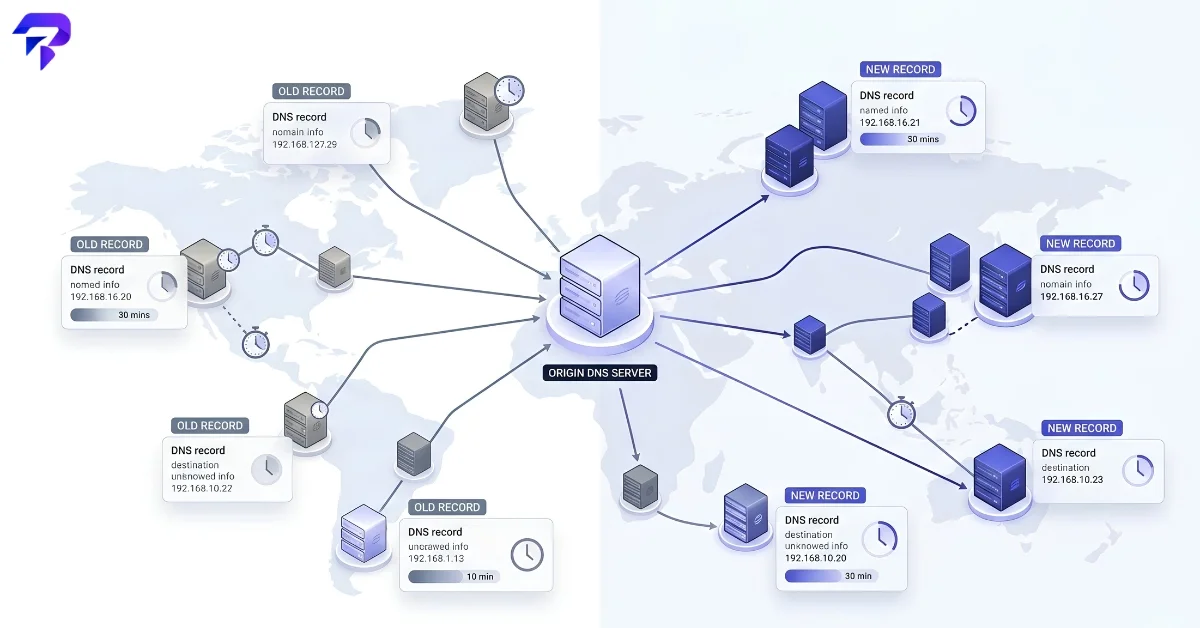
DNS propagation isn’t a single event pushed out to the world at once. It’s the gradual expiry of cached copies of your old DNS record sitting on resolvers all over the internet — your ISP’s resolver, Google’s public DNS, Cloudflare’s 1.1.1.1, your office network, your phone. Each one cached your old record for a set amount of time and won’t check for a new one until that time is up.
That’s why the same domain can resolve to your new server for one person and your old server for another, at the exact same moment. Nobody is doing anything wrong — the two resolvers just cached the record at different times.
TTL: the number that controls all of it
Every DNS record has a TTL (Time To Live) value, set by whoever manages the authoritative DNS zone, measured in seconds. When a resolver looks up your record, it caches the answer for exactly that many seconds before it’s allowed to ask again.
- TTL of 3600 = cached for 1 hour
- TTL of 86400 = cached for 24 hours (a common default)
- TTL of 300 = cached for 5 minutes
A low TTL means resolvers re-check more often, so changes show up faster — at the cost of more lookup traffic hitting your authoritative nameservers. A high TTL reduces that load but means old records linger longer after a change. That trade-off is exactly why lowering TTL before a planned migration is the standard move: it shrinks the propagation window right when you need it shortest.
Why it isn’t always predictable, even with a low TTL
TTL is a strong guideline, not an absolute guarantee. A few things can stretch propagation beyond what the TTL alone suggests:
- Resolvers that ignore the TTL. Some ISP-level resolvers cache longer than instructed, regardless of what the record says.
- Registrar-level changes vs. record-level changes. Changing nameservers at your domain registrar involves an extra layer — the registry itself needs to update, which can take longer than a simple record change at your existing DNS provider.
- Local device and browser caching. Your own computer or browser may hold onto the old resolution independent of any DNS server.
In practice, most straightforward record changes (updating an A record with your DNS provider unchanged) are visible almost everywhere within an hour or two if the TTL was already low. Full nameserver changes are the slower case and can realistically take anywhere from a few hours up to 24–48 hours to be consistent globally, since it involves the domain registry itself, not just your DNS host.
Record changes vs. nameserver changes
Not all DNS changes propagate at the same speed, because they don’t all involve the same layer of the system:
- Changing a record’s value (say, pointing an A record at a new IP address, with the same DNS provider) only depends on that record’s TTL. If the TTL was already short, this is usually the fastest kind of change to see reflected.
- Changing nameservers (moving a domain’s DNS hosting to a different provider entirely) is slower, because it also has to update at the domain registry level — the authoritative source that tells the entire internet which nameservers to even ask. Registry-level updates typically carry their own caching behavior on top of any record TTL, which is why nameserver migrations are the change most likely to take the better part of a day or two to be fully consistent worldwide.
If you’re only changing where a domain points and staying with the same DNS provider, you’re in the faster, more predictable category. If you’re switching DNS providers entirely, plan for the slower one.
What split traffic actually looks like in practice
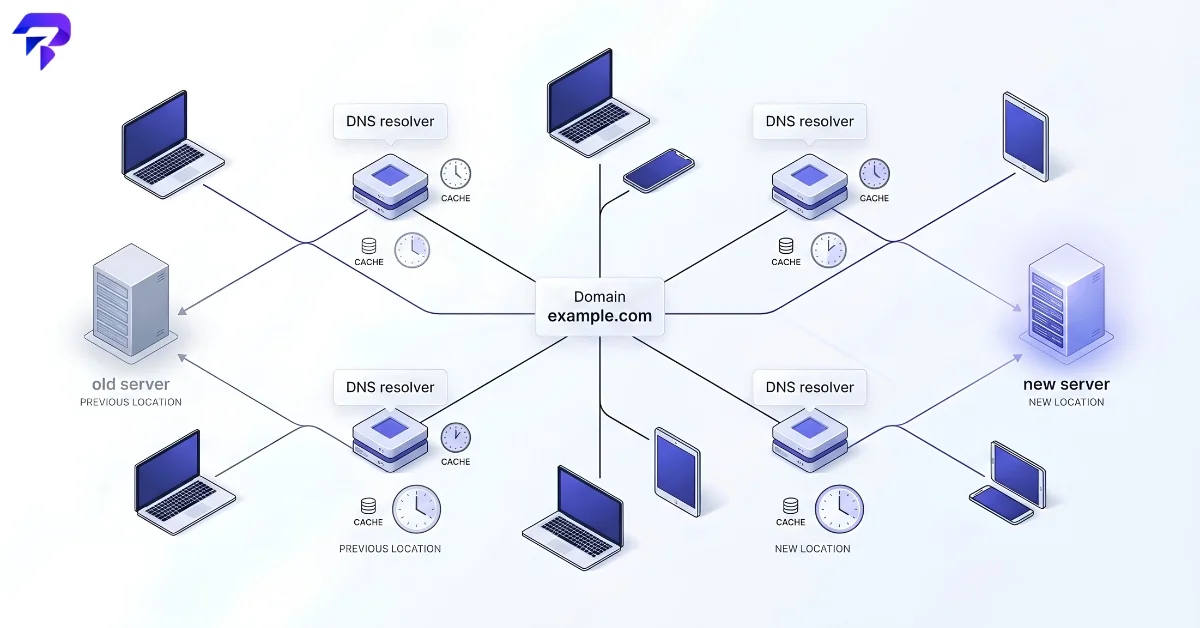
During the propagation window, it’s normal — not a sign of a broken migration — for a portion of visitors to land on your old server and the rest on the new one, split roughly along the lines of which resolver each person’s device happens to be using and when that resolver last cached the record. This is exactly why the standard playbook is to keep the old server running and serving correctly until propagation is confirmed complete, rather than treating the DNS change itself as the finish line.
How to make a DNS change with the least disruption
- Lower the TTL on the record you’re about to change, at least 24–48 hours ahead of time if possible, so the old, longer TTL has already fully expired everywhere before you make the real change.
- Make the change once the low TTL has taken effect.
- Verify from multiple locations, not just your own connection — your ISP’s resolver may already show the new record while others haven’t caught up yet.
- Keep the old server running until you’ve confirmed traffic has fully shifted, rather than shutting it down the moment you make the DNS change.
- Raise the TTL back to a normal value once you’ve confirmed the new record is stable and fully propagated.
Checking propagation status yourself
Rather than guessing, check what different points on the internet are actually seeing:
- ToolPremier’s DNS propagation checker queries resolvers in multiple locations at once so you can see exactly which regions have picked up the new record and which are still serving the cached one.
- The DNS records checker is useful for confirming the record itself is configured correctly in the first place — a propagation delay and a misconfigured record look identical from the outside until you check.
- For a fuller picture of a domain’s DNS setup — not just one record — the DNS report checker gives a broader health check.
- If you want to confirm the server itself is reachable from different regions once DNS has updated, pinging the domain from multiple locations is the natural next check.
If a site looks fine to you but reports keep coming in that it’s unreachable elsewhere, DNS propagation is one of the first things worth ruling out — see our guide on checking whether a site is actually down for the rest of the troubleshooting steps.
FAQ
Can I force DNS to propagate faster?
Not after the fact — once a resolver has cached your record, there’s no remote way to clear that specific cache. The only real lever is lowering the TTL before you make the change, so less gets cached for as long in the first place.
Why does my own computer still show the old site after DNS has clearly updated elsewhere?
Your operating system and browser keep their own local DNS cache, separate from any public resolver. Flushing your local DNS cache (or simply waiting out your own device’s cache duration) usually resolves it even when every external check confirms the new record is live.
What’s a safe TTL to set before making a DNS change?
There’s no universal number, but a common approach is lowering the TTL to something like 300–600 seconds at least 24–48 hours before the change, so the old, longer TTL has fully expired everywhere by the time you actually make the switch. Once the new record is confirmed stable, raise the TTL back to a normal value.
The Bottom Line
DNS propagation isn’t a bug — it’s caching working as designed, and the fix is patience plus a lower TTL set well ahead of a planned change. Clearing your own device’s DNS cache resolves most ‘it’s not showing for me’ cases, and checking propagation with a multi-location tool confirms whether the record has actually gone live elsewhere.


