
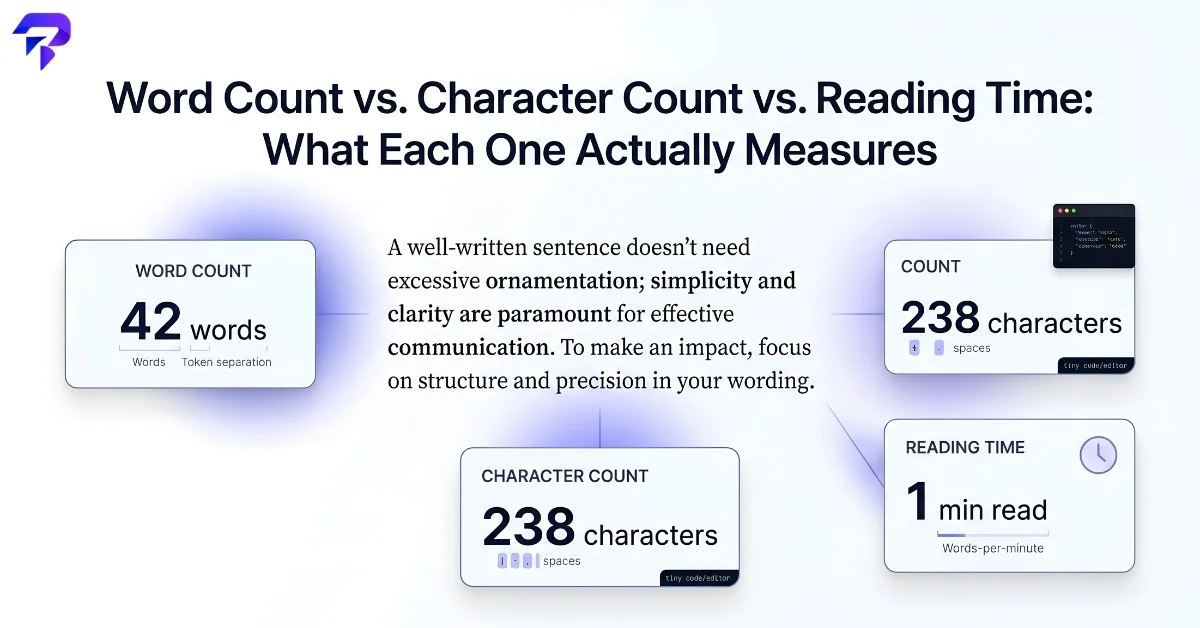
Word count: not as simple as it sounds
Most word counters split text on whitespace and punctuation, then count the resulting chunks. That sounds mechanical, but a few edge cases produce genuinely different results between tools:
Hyphenated words. Is “well-known” one word or two? Some counters treat the hyphen as a word boundary (two words); others treat it as part of a single token (one word). Neither answer is wrong — it’s a design choice.
Numbers and symbols. Does “$4,500” count as one word, or does the counter split on the comma? Does an em dash separating two clauses create a word boundary?
Contractions. “Don’t” is usually one word, but a counter that splits on apostrophes could register it as two tokens.
None of this matters much for a rough estimate, but it explains why pasting the same paragraph into two different word counters can give you numbers a few percent apart. ToolPremier’s word counter and character counter use consistent, transparent rules, which matters most when you’re working against a hard limit — an assignment’s word cap, a platform’s post length, or a metadata field with a strict character budget.
Character count: with spaces or without?
Character count is more mechanical than word count, but it still has one major fork: counting with spaces (every character including whitespace) versus without spaces (letters, numbers, and punctuation only). The gap between the two numbers grows with the length of the text — spaces typically make up somewhere around 15–18% of the characters in ordinary English prose, since the average English word is a handful of letters plus one trailing space.
This distinction matters practically for platforms and forms that specify one or the other. A meta description limit, an SMS character cap, or a form field’s maxlength attribute is usually counting with spaces included, since that’s what actually determines how much space the text occupies. When a limit doesn’t specify which it means, assuming “with spaces” is the safer default.
Reading time: an estimate, not a measurement
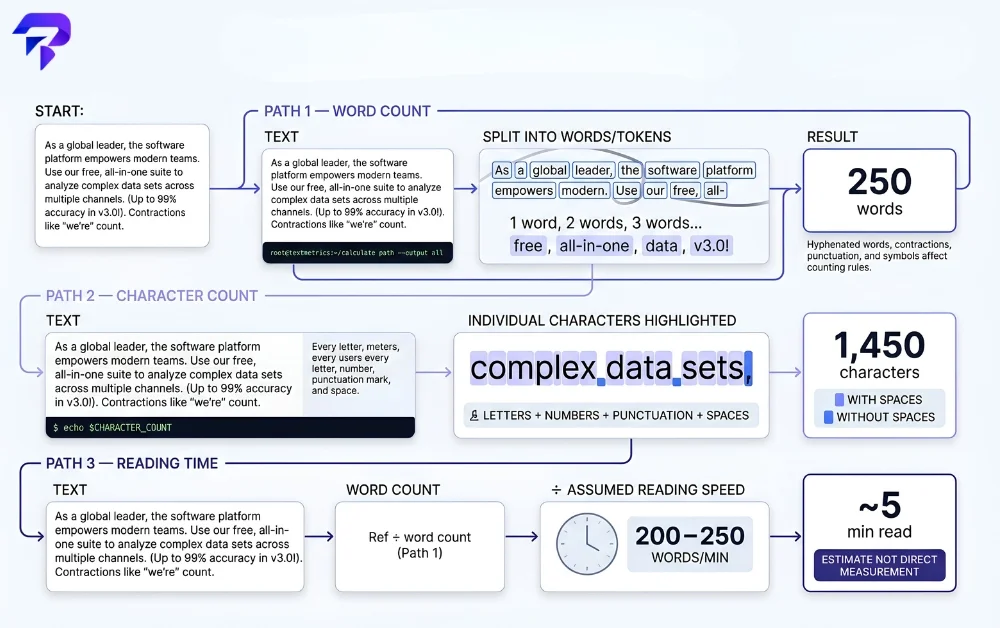
Reading time is a different kind of number entirely — it’s not counted directly from the text, it’s calculated by dividing the word count by an assumed reading speed, then rounding to a readable figure like “4 min read.” Most reading-time estimates on the web use a reading speed somewhere in the range of 200–250 words per minute for adult silent reading of ordinary prose, though the right number genuinely varies by reader, by language, and by how technical or dense the text is.
That’s why reading-time estimates should be read as a rough, useful signal rather than a precise prediction — the same 1,000-word article might take one reader three minutes and another reader six, depending on reading speed, familiarity with the topic, and whether they’re skimming or reading closely. ToolPremier’s reading time calculator gives you that estimate instantly from pasted text, which is genuinely useful for setting reader expectations on a blog post or article even though it isn’t a stopwatch measurement.
Which number actually matters for your task
The right metric depends on what you’re trying to satisfy:
A strict submission limit (“no more than 500 words”) calls for word count, matched to whatever splitting rule the platform or instructor actually uses.
A field with a hard technical limit (a tweet, an SMS, a meta description, a database column) calls for character count — usually with spaces included, since that’s what’s actually being constrained.
Setting reader expectations on a blog post, newsletter, or long-form page calls for reading time, since “3-minute read” communicates something word count and character count don’t: how much of the reader’s time you’re asking for.
Related tools worth knowing about
A few related counts solve narrower problems: sentence counting is useful for checking sentence-length variety in your own writing, and line counting matters for code, poetry, or anything formatted around line breaks rather than continuous prose. And if inconsistent spacing is throwing off a character count you’re relying on, ToolPremier’s remove extra whitespace tool cleans that up before you count.
FAQs
Does Microsoft Word count words the same way online word counters do?
Usually very close, but not guaranteed identical. Word processors and online counters both split on whitespace and punctuation, but they can differ on the same edge cases described above — hyphenated terms, numbers with symbols, contractions — so a document can show a slightly different count in Word than it does pasted into a web-based counter. If you’re up against a hard limit set by a specific platform (a journal submission, a form field), use whichever tool actually enforces that limit rather than trusting a different tool’s number to match exactly.
How many words are typically in a “page”?
Publishing and academic conventions generally use roughly 250–300 words per page for standard double-spaced text in a common font size (like 12pt Times New Roman), and roughly 500–600 for single-spaced. This is a formatting convention, not a fixed rule — the real number depends entirely on font, size, margins, and spacing, so “a 10-page paper” is really shorthand for a word-count range agreed upon by convention, not something a word counter can verify without knowing the exact formatting.
Do word and character counters work the same way for languages like Chinese or Japanese?
Word count breaks down for these languages, though character count still works fine. Chinese, Japanese, and similar languages don’t use spaces between words the way English does, so a counter that splits on whitespace either returns a near-meaningless “word count” or has to use language-specific segmentation logic to guess where words start and end. Character count doesn’t have this problem, since it’s just tallying individual characters regardless of language — which is why character count, not word count, is the more meaningful metric for platforms and limits involving these languages.
Can a reading-time estimate account for how technical or dense a specific piece of text is?
Not really, and that’s a real limitation worth knowing about. Most reading-time tools apply one flat words-per-minute assumption to any text you paste in, whether it’s a casual blog post or a dense technical spec — they’re not analyzing sentence complexity, vocabulary difficulty, or how much the reader needs to pause and reread. Treat the estimate as a rough average-reader baseline, and expect genuinely technical or unfamiliar content to take noticeably longer than the number suggests.
The Bottom Line
Word count, character count, and reading time each measure something different, and the right one to check depends on what limit you’re actually working against — a platform’s character cap, a publication’s word count target, or a rough sense of how long a piece takes to read. When the number matters, check it directly with a counter rather than estimating.


