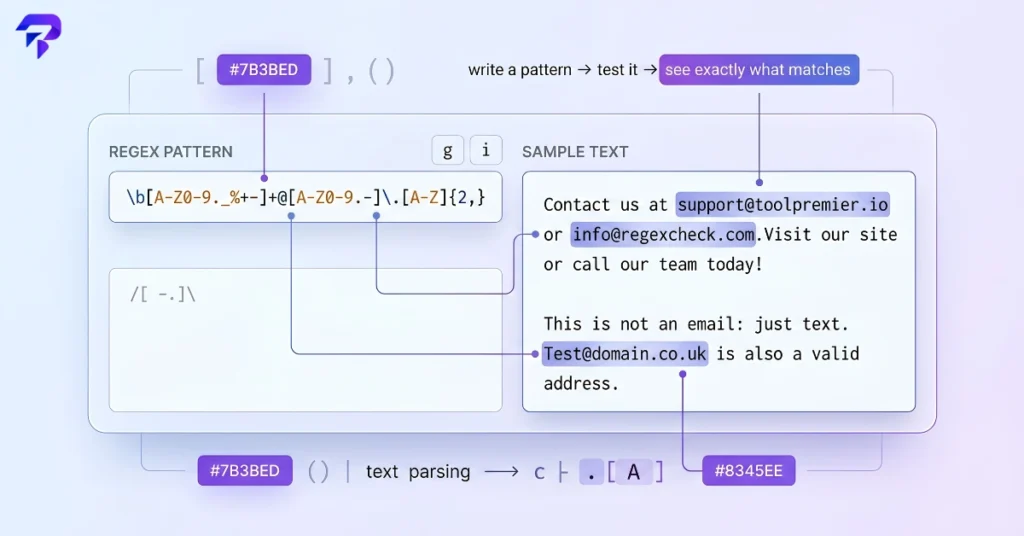
Quick answer: A regex tester lets you write a regular expression — a compact pattern for matching text, like ^d{3}-d{4}$ for a phone number — and run it against sample text immediately, so you can see exactly what it matches, what it misses, and where it breaks. Instead of pasting a pattern into your actual code, running it, and guessing why it failed, you test the pattern first and fix it before it touches production.
What a regular expression actually is
A regular expression, or regex, is a sequence of characters that describes a search pattern. It’s built into most programming languages — JavaScript, Python, Java, PHP, and many others all support the same core regex syntax, with small variations. You use it to match, find, or replace text based on a pattern instead of an exact string.
Instead of searching for the literal text “555-1234”, a regex can search for “any three digits, followed by a hyphen, followed by any four digits” — which matches every phone number in that format, not just one. That’s the entire point of regex: it lets you describe a shape of text rather than one specific instance of it.
The syntax itself is where people get stuck. A few characters carry outsized meaning:
.matches any single character*means “zero or more of the previous thing”+means “one or more of the previous thing”dmatches any digit,wmatches any word character,smatches whitespace[]defines a set of characters to match, like[a-z]for lowercase letters^and$anchor a match to the start or end of a line()groups part of a pattern, often so you can capture and reuse that piece
None of that is intuitive on first read, and a pattern with five or six of these stacked together — which is normal for anything real, like an email validator — is genuinely hard to parse by eye. That’s the gap a regex tester fills.
Why you can’t just write regex and hope it works
Regex has a specific failure mode: it almost never throws a clean error. A pattern with a small mistake usually still runs — it just matches the wrong thing, or matches nothing, or matches too much. A missing anchor lets a pattern match text buried in the middle of a string instead of the whole line. A greedy quantifier like .* can gobble up far more text than intended, especially across multiple lines.
Writing a regex “in your head” and dropping it straight into code means you find out it’s wrong only when a form accepts a bad email address, a script silently skips half your log lines, or a find-and-replace mangles text you needed to keep intact. Testing the pattern against real sample data first turns that invisible failure into something you can see immediately.
What a regex tester actually shows you
A regex tester is a small, focused tool: you paste in sample text, write your pattern, and it highlights every match live as you type. Most also show:
- Match highlighting — every substring that matches gets visually marked in the sample text, so you can immediately see if the pattern is too broad, too narrow, or catching the wrong section.
- Capture groups — if your pattern uses parentheses to isolate part of a match (like pulling just the area code out of a phone number), the tester shows each captured group separately.
- Flags/modifiers — toggles for common options like case-insensitive matching, multiline mode, or global matching (find all matches, not just the first).
- Match count — a simple total of how many matches were found, useful for confirming a pattern isn’t accidentally matching zero times or matching everything.
None of this requires writing a script, opening a console, or touching the codebase where the regex will eventually live. You’re isolating one variable — the pattern — and checking it against known input before it goes anywhere near real data.
Common situations where you’d actually use one
Regex testing tends to come up in a handful of recurring situations, across pretty different jobs:
- Building form validation. You need a pattern that accepts valid emails, phone numbers, or postal codes and rejects everything else, without being so strict it blocks legitimate entries.
- Searching logs. You’re looking for every line that matches an error code format, an IP address, or a timestamp pattern across a large log file, and a plain text search isn’t specific enough.
- Cleaning up data. A marketer or analyst has a spreadsheet export with inconsistent formatting — extra spaces, mixed date formats, stray characters — and needs a pattern to find and standardize it.
- Following a tutorial. A guide hands you a regex snippet to copy, and you want to understand what it actually does and confirm it works with your specific data before using it.
- Debugging someone else’s pattern. You inherited code with a regex buried in it, it’s not doing what you expect, and you need to see what it’s actually matching to figure out where it goes wrong.
In every one of these, the regex isn’t the end goal — it’s a step toward validating a form, searching a file, or cleaning a dataset. The tester is what lets you confirm that step works before moving to the next one.
Testing a pattern vs. using it for find-and-replace
Testing and matching are only half of what regex is used for. The other common use is find-and-replace: matching a pattern and swapping it for something else, across an entire document at once. That’s how you’d reformat every date in a document from MM/DD/YYYY to YYYY-MM-DD, or strip out every instance of a tracking parameter from a list of URLs, in one pass instead of one edit at a time.
Once you’ve confirmed a pattern matches correctly, ToolPremier’s Find & Replace tool lets you apply that same pattern to actually transform text, using capture groups to control exactly how the replacement is structured. And if you want to confirm exactly what changed after a batch replace — rather than scanning the whole document manually — the Text Diff Checker will show you precisely which lines were altered.
Does it matter if a regex tester runs in your browser?
If the sample text you’re testing against contains anything sensitive — real customer data, internal log files, unreleased content — it’s worth knowing where that text goes once you paste it in. Some online tools send input to a server to process it. ToolPremier’s Regex Tester runs entirely client-side: the pattern and the sample text you’re testing stay in your browser and are never uploaded anywhere, which matters if you’re testing against a real customer record instead of a made-up example.
A short regex cheat sheet for the basics

You don’t need to memorize regex syntax to test a pattern effectively — you mainly need to recognize the handful of symbols that show up constantly:
| Symbol | Meaning | Example |
|---|---|---|
d |
Any digit (0–9) | d{3} matches exactly 3 digits |
w |
Any word character (letters, digits, underscore) | w+ matches one or more |
s |
Any whitespace character | space, tab, or line break |
. |
Any single character except a line break | a.c matches “abc”, “a1c” |
* |
Zero or more of the previous item | ab* matches “a”, “ab”, “abbb” |
+ |
One or more of the previous item | ab+ matches “ab”, “abbb”, not “a” |
? |
Zero or one of the previous item (optional) | colou?r matches “color” and “colour” |
^ / $ |
Start / end of the line | ^Hello matches only at the start |
[] |
A set of allowed characters | [aeiou] matches any vowel |
() |
Groups part of the pattern, often for capturing | (d{3})-(d{4}) captures two groups |
Keep this next to a tester rather than trying to hold it in your head. Regex is far easier to read once you’ve matched a few symbols against real examples than it is to write correctly from memory the first time.
FAQs
Do I need to know how to code to use a regex tester?
No. You paste in your sample text, write or paste in a pattern, and the highlighted matches tell you whether it’s working. Plenty of people who use regex testers — marketers cleaning up spreadsheets, QA testers checking validation rules — aren’t writing the surrounding application code at all.
What’s the difference between a regex tester and a regex validator?
In practice, the terms overlap. A regex tester runs your pattern against sample text and shows matches. A regex validator usually refers to the narrower task of checking whether a pattern itself is syntactically valid — no unclosed brackets, no dangling special characters — before you even test it against data. Most regex testers do both: they’ll flag an invalid pattern and also show you what a valid one actually matches.
Why does my regex match too much or too little?
The most common cause is a greedy quantifier. * and + match as much text as possible by default, so a pattern like ".*" meant to grab one quoted phrase can stretch across multiple quotes in the same line and match everything in between. Switching to a non-greedy version (.*? in most regex flavors) usually fixes it by matching the shortest possible string instead.
Are regex patterns the same across every programming language?
Mostly, but not entirely. The core syntax — d, *, [], and so on — is shared across JavaScript, Python, PHP, and most other languages, since they all derive from the same general regex standard. Differences show up in edge cases: how certain flags are written, how lookbehind is supported, or small syntax quirks between engines. A pattern tested in a general-purpose tester will usually work as-is, but it’s worth double-checking flavor-specific features before relying on them in a specific language.
Can a regex tester fix a broken pattern for me?
It can show you where a pattern is invalid or what it’s actually matching versus what you expected, which is usually enough to spot the fix yourself. It won’t guess your intent — if you meant to match a 4-digit year but wrote a pattern that matches any 4 characters, the tester will faithfully show you that it’s matching letters too, but you still have to tighten the pattern.
The bottom line
Regex is powerful precisely because it’s compact, and that compactness is exactly why it’s hard to read correctly on the first try. A regex tester turns “does this pattern do what I think it does” from a guess you find out about later into something you confirm in seconds, against your actual sample text. Write the pattern, test it against real examples, fix what breaks, then use it — whether that’s for validating a form, searching a log, or running a find-and-replace across a document.
Try it yourself with ToolPremier’s Regex Tester — paste in your pattern and sample text and see exactly what matches, entirely in your browser.