
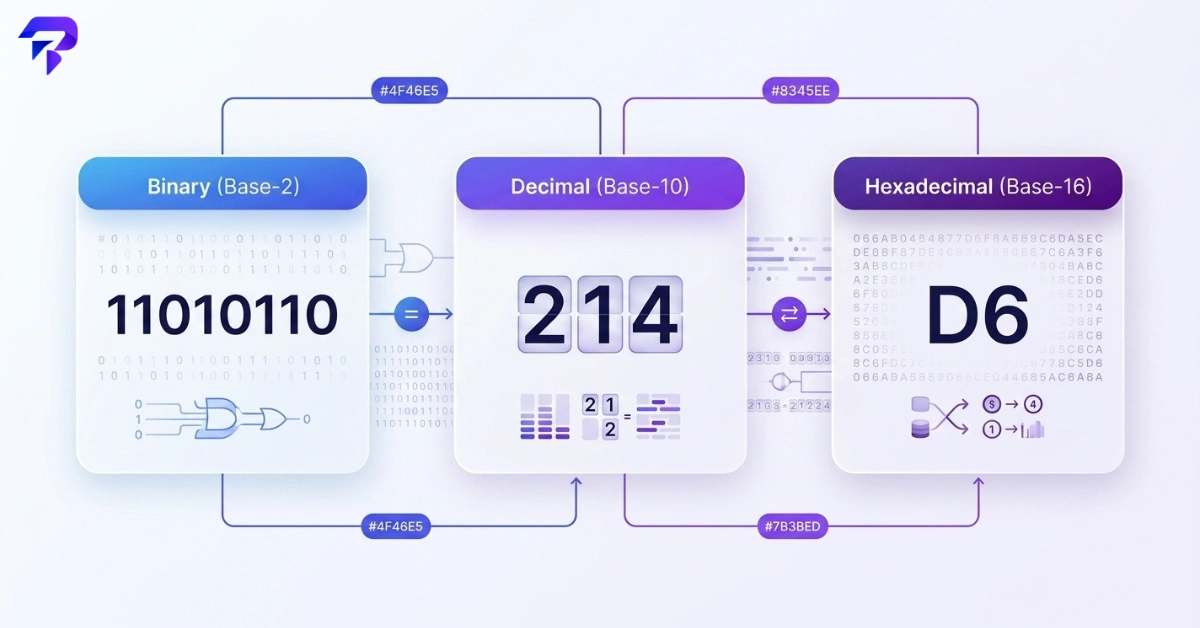
Quick answer: Binary (base 2), decimal (base 10), and hexadecimal (base 16) are three different ways of writing the same number. The difference is how many unique digits each system has before it rolls over to the next place value. Decimal uses 10 digits (0-9) because humans standardized on counting with ten fingers. Binary uses only 2 digits (0 and 1) because a transistor or memory cell is cheapest and most reliable when it only has to represent two states, on or off. Hex uses 16 digits (0-9, then A-F) purely as a shorthand for binary, since every hex digit lines up exactly with 4 binary digits. None of the three is more “real” than the others. They’re just different bases for counting the same quantity, and you can convert freely between them, including with a free number system converter online.
Why computers count in binary at all
A computer’s memory and processor are built from billions of transistors, and each transistor is fundamentally a switch: current flowing, or not. Building hardware that reliably distinguishes ten different voltage levels, the way decimal would require, is far harder and more error-prone than building hardware that only needs to tell “on” from “off.” Binary won out early in computing history because it maps directly onto that physical reality. Every number, letter, image, and instruction a computer handles is ultimately stored as a sequence of these on/off states, written down as 1s and 0s.
The three number systems, side by side
Before getting into conversion math, it helps to see the systems next to each other.
| System | Base | Digits used | Where you’ll see it |
|---|---|---|---|
| Decimal | 10 | 0 through 9 | Everyday counting, prices, dates, measurements |
| Binary | 2 | 0 and 1 | How computers store and process data internally |
| Hexadecimal | 16 | 0 through 9, then A through F | Color codes, memory addresses, debugging output, character codes |
How place value works, in any base
Every number system uses the same underlying idea: positional notation. Each digit’s value depends on where it sits, multiplied by a power of the base.
In decimal, the rightmost position is worth 1 (10 to the power of 0), the next position moving left is worth 10 (10 to the power of 1), the next is worth 100 (10 to the power of 2), and so on. The number 214 means 2 hundreds, 1 ten, and 4 ones: (2 x 100) + (1 x 10) + (4 x 1) = 214.
Binary works exactly the same way, except each position is a power of 2 instead of a power of 10: 1, 2, 4, 8, 16, 32, 64, 128, and so on, reading right to left.
Hex works the same way too, except each position is a power of 16: 1, 16, 256, 4096, and so on.
Once that clicks, converting between systems is just arithmetic, not a different kind of logic.
Converting binary to decimal, step by step
Take the binary number 11010110. Line each digit up with its place value, starting from the right with 1 and doubling each time you move left: 128, 64, 32, 16, 8, 4, 2, 1.
Now multiply each binary digit by its place value and add up only the positions that hold a 1:
- 1 x 128 = 128
- 1 x 64 = 64
- 0 x 32 = 0
- 1 x 16 = 16
- 0 x 8 = 0
- 1 x 4 = 4
- 1 x 2 = 2
- 0 x 1 = 0
Add the non-zero results: 128 + 64 + 16 + 4 + 2 = 214. So binary 11010110 equals decimal 214.
This is exactly how to convert binary to decimal by hand, and it works for a binary number of any length, you’re just adding more place values (256, 512, 1024…) as the number gets longer. If you’d rather skip the arithmetic, the Binary to Decimal Converter does this instantly and shows the same place-value breakdown.
Converting decimal to binary, step by step
Going the other direction uses repeated division by 2, keeping track of the remainder each time.
Take decimal 214:
- 214 divided by 2 = 107, remainder 0
- 107 divided by 2 = 53, remainder 1
- 53 divided by 2 = 26, remainder 1
- 26 divided by 2 = 13, remainder 0
- 13 divided by 2 = 6, remainder 1
- 6 divided by 2 = 3, remainder 0
- 3 divided by 2 = 1, remainder 1
- 1 divided by 2 = 0, remainder 1
Read the remainders from bottom to top: 11010110. That matches the binary-to-decimal example above, confirming both directions agree: decimal 214 is binary 11010110.
What hex is for, and how to convert it
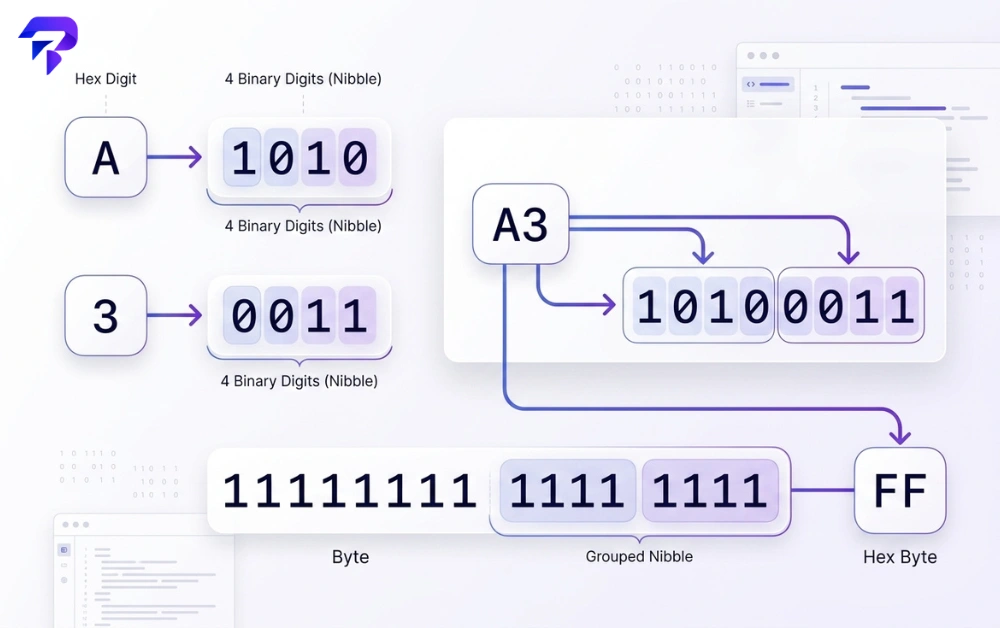
Hex exists because raw binary is hard for people to read and write. A single byte (8 bits) can represent 256 different values, meaning binary needs eight characters every time, like 11111111. Hex compresses that to two characters, because each hex digit represents exactly 4 binary digits (a “nibble”), and 4 binary digits cover 16 possible values, 0 through 15, the exact range of a single hex digit (0-9, then A=10 through F=15).
That’s why a full byte, binary 11111111, is written as hex FF: each half of the byte (1111) equals 15, or F. In decimal, hex FF equals 255, since (15 x 16) + 15 = 255, which is also why 255 is such a common ceiling in computing, the highest value a single byte can hold.
For a mixed example, hex A3 converts to decimal like this: A is 10, so the first digit is worth 10 x 16 = 160. The second digit, 3, is worth 3 x 1 = 3. Add them: 160 + 3 = 163. So hex A3 equals decimal 163.
Working this out by hand helps you understand what hexadecimal actually is, but for anything longer than two digits, the Hex to Decimal Converter handles the multiplication instantly and with no risk of arithmetic error.
Binary, decimal, and hex from 0 to 15
Seeing all three systems mapped against each other for the same small set of numbers makes the pattern click faster than any explanation.
| Decimal | Binary | Hex |
|---|---|---|
| 0 | 0000 | 0 |
| 1 | 0001 | 1 |
| 2 | 0010 | 2 |
| 3 | 0011 | 3 |
| 4 | 0100 | 4 |
| 5 | 0101 | 5 |
| 6 | 0110 | 6 |
| 7 | 0111 | 7 |
| 8 | 1000 | 8 |
| 9 | 1001 | 9 |
| 10 | 1010 | A |
| 11 | 1011 | B |
| 12 | 1100 | C |
| 13 | 1101 | D |
| 14 | 1110 | E |
| 15 | 1111 | F |
Notice that hex never needs more than one digit until you pass 15, while binary already needs four. That’s the entire reason hex is used as a readable stand-in for binary: it says the same thing in a quarter of the characters.
Where this actually shows up outside a computer science class
- Color codes in design and web work. A CSS color like #4F46E5 is three pairs of hex digits, one pair each for red, green, and blue, with each pair ranging from 00 to FF (0 to 255).
- Character encoding. The letter “A” is code point 65 in ASCII and Unicode, sometimes written U+0041, since 65 in decimal is 41 in hex.
- Debugging and error messages. Memory addresses and crash dumps are almost always shown in hex, since it’s far more compact than binary and maps cleanly onto how memory is organized in bytes.
- Networking. MAC addresses and IPv6 addresses are written in hex for the same reason, shorter strings that still map directly onto a fixed number of bits.
You don’t need to memorize any of this to use a computer, but recognizing a hex or binary string and knowing roughly what it represents is a genuinely useful skill for IT support, development, and troubleshooting work.
Do I need to memorize the conversion tables
No. The place-value method above will get you through any conversion by hand if you need it, but for regular use, a dedicated tool is faster and eliminates arithmetic mistakes. The Number System Converter converts between binary, decimal, and hex in real time, directly in your browser, with nothing uploaded anywhere.
FAQs
What’s the difference between base 2, base 10, and base 16?
The difference is how many unique digits each system uses before rolling over to a new place value: 2 for binary, 10 for decimal, 16 for hex. A larger base packs more information into fewer digits, which is why hex numbers are shorter than binary numbers representing the same value.
Why do computers use binary instead of decimal?
Because the hardware that stores and processes data, transistors and memory cells, is built around two reliable physical states, on and off. Representing ten distinct states reliably at that scale is far less practical than representing two.
Is hexadecimal just a shorter version of binary?
Functionally, yes. Every hex digit maps to exactly 4 binary digits, so hex is really binary written in a more compact, human-readable form rather than a separate concept.
How do I convert binary to decimal without a calculator?
Assign each binary digit its place value, starting from the right at 1 and doubling for each position moving left (1, 2, 4, 8, 16…), then add up the place values wherever there’s a 1. The worked example above walks through this with binary 11010110.
What is hexadecimal used for besides color codes?
Memory addresses, debugging output, character encoding (like Unicode code points), MAC addresses, and IPv6 addresses all commonly use hex, because it represents binary data in a much shorter, easier-to-read format. Binary, decimal, and hex are all positional number systems, where a digit’s place determines its value. Roman numerals work completely differently — no place value, no zero — which makes them a useful contrast; see how Roman numerals actually work if you’re curious. Prime numbers are a different lens on the same digits — see our guide to what makes a number prime for how primality testing works and why it matters for cryptography. For a different kind of number pattern entirely — one built by addition rather than place value — see how the Fibonacci sequence actually works.
Bottom line
Binary, decimal, and hex aren’t three different kinds of math, they’re three different ways of writing the same numbers, chosen for different audiences: decimal for people, binary for hardware, and hex as a compact bridge between the two. Once you understand place value, converting between them is mechanical, not mysterious, and when you don’t feel like doing the arithmetic by hand, a browser-based converter will do it instantly and correctly.
Convert any number between binary, decimal, and hex right now with the Number System Converter, free and processed entirely in your browser.


